
Finding the Best AI Avatar Generator for Consistent Characters
If you're looking for the best AI avatar generator, you’ve probably noticed the biggest challenge: getting the same face to show up in every picture. The top tools, like PhotoMaxi, are built to nail character consistency, giving you a reliable digital persona you can actually use for your brand or content.
What Is an AI Avatar Generator?
Think of it this way: you have a digital actor on call, 24/7, ready to step into any scene you can imagine. That’s essentially what an AI avatar generator does. It takes one good photo of a person and uses it as a kind of digital DNA to create a massive library of brand-new images.
It’s like having a Hollywood-level special effects team and a photography studio at your fingertips. You provide the "actor" (your photo), and the AI can dress them in different outfits, place them in new locations, and change the lighting—all while making sure they still look like the original person. This isn't just slapping a filter on a photo; it’s generating completely new visuals based on your text prompts.
The Magic of Consistency
The real trick—and what separates a decent tool from the best AI avatar generator—is character consistency. This is the secret sauce that keeps your avatar’s core facial features the same across hundreds of different images. After all, if your avatar is the face of your brand, they need to look the same in a summer promo as they do in a winter campaign.
Without consistency, you just have a bunch of random, disconnected pictures. With it, you build a recognizable digital identity. This all boils down to two critical ideas:
- Likeness Fidelity: How much does the generated avatar actually look like the person in the original photo? High fidelity means you can instantly tell it's them.
- Character Consistency: Can the AI maintain that strong likeness across all sorts of styles, poses, and settings?
A great AI avatar generator acts like your own personal branding expert. It ensures that no matter where your digital representative shows up—on social media, in an ad, or on your website—they are immediately recognizable, which builds trust and familiarity with your audience.
From Fun Gimmick to Essential Tool
This technology has quickly moved past being a fun novelty and is now a core tool for creators and businesses. The demand is skyrocketing, showing a huge shift in how we create digital content. The global AI Avatar market was valued at USD 2.5 billion in 2024 and is projected to hit an incredible USD 63.5 billion by 2034.
This massive growth is happening because people need high-quality visuals at scale, without the massive costs and headaches of traditional photoshoots. You can learn more about these market trends and their implications.
For a content creator, this means cranking out a month's worth of unique social media images in a single afternoon. For an e-commerce brand, it’s creating professional model shots for a new product line without booking a studio or hiring models. This kind of efficiency and creative power is exactly why finding the right generator is no longer optional—it's essential.
How to Choose the Right AI Avatar Generator for Your Needs
Trying to find the single best AI avatar generator is a bit like asking for the "best" car—it all depends on where you're going and what you need to carry. The right tool isn't a one-size-fits-all solution. It's a matchmaking game. A solo creator making viral TikToks has vastly different needs than an ecommerce brand preparing for a major product launch.
So, how do you cut through the marketing fluff? Instead of getting dazzled by a long list of features, it’s better to focus on the handful of criteria that actually determine the quality and usability of your final images. Think of this as your practical checklist for making a smart choice.
The first question to ask is simple but crucial: are you building a consistent character for a brand, or do you just need a bunch of cool, one-off images? This one decision points you in the right direction.
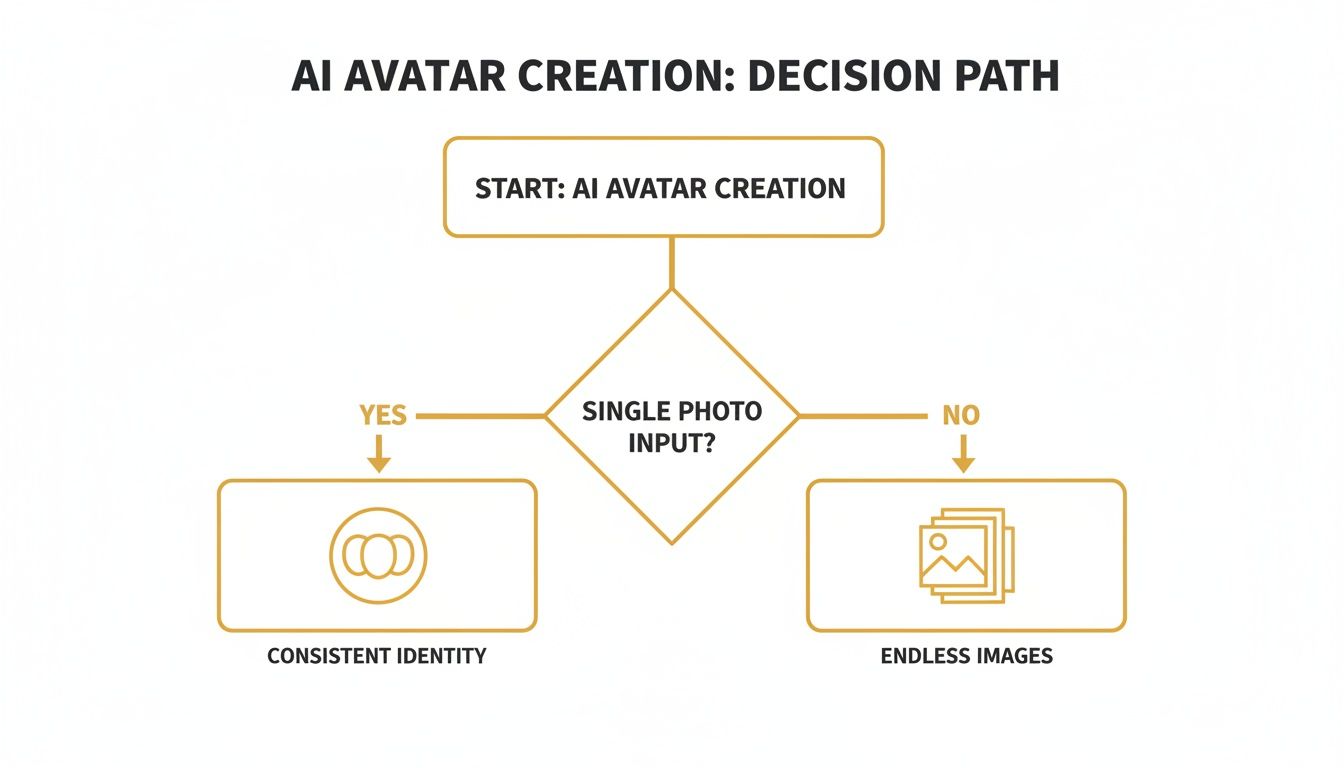
This fork in the road separates tools designed for character branding from those built for creative variety.
1. Character Consistency and Likeness Fidelity
For anyone trying to build a brand or a memorable online persona, this is the holy grail. Character consistency is the ability of an AI to keep your avatar looking like the same person across countless different scenes, outfits, and poses. It’s what separates a true digital spokesperson from a chaotic album of loosely related faces.
Imagine running a social media campaign. Your audience needs to recognize your avatar instantly, whether she’s sipping coffee in a Parisian café or hiking in the mountains. If the likeness wavers, your brand message gets diluted. That’s why you need to look for platforms that prioritize high likeness fidelity—making sure the avatar always looks like the person in your source photos.
2. Image Quality and Resolution
Let's be blunt: not all AI images are created equal. Some generators churn out stuff that looks blurry, pixelated, or just plain weird. For any kind of professional work, from ad creative to website assets, high-quality output is completely non-negotiable.
Here’s what to look for when you're kicking the tires on a new tool:
- Resolution Options: Can you get images big enough for print or a giant digital billboard? A 1024x1024 pixel image is fine for an Instagram post, but you’ll need much more for professional-grade creative.
- Photorealism: How believable is the final image? The best tools nail the subtle details like realistic lighting, skin textures, and shadows, creating something that could pass for a professional photograph.
- Artistic Flaws: Keep an eye out for the classic AI blunders—mangled hands, bizarre background objects, and unnatural poses. A solid generator keeps these mistakes to a minimum.
3. Customization and Control
An AI generator should feel like a creative partner, not a slot machine where you just pull the lever and hope for the best. The amount of control you have over the final image is what separates a decent tool from a great one. You need the ability to direct the AI with precision.
The best tools give you granular control. They allow you to go beyond simple text prompts and adjust key elements like camera angles, lighting styles (e.g., "golden hour" or "studio lighting"), and even the emotional expression of your avatar. This is what transforms a generic output into a purpose-driven, on-brand asset.
When a platform offers advanced features like negative prompts (telling the AI what not to include), you gain the power to art-direct your virtual photoshoot. This level of control is what ensures the final images actually match the vision in your head.
4. Usage Rights and Licensing
This is the boring-but-critical part that can save you from a world of legal and financial headaches. Before you get too invested in creating an avatar, you absolutely have to understand what you're legally allowed to do with the images. Many free or cheap tools only give you a license for personal, non-commercial use.
If you plan on using your avatars for anything that makes money—marketing, ads, product packaging, or a monetized YouTube channel—you must have a commercial license. Don't skim the terms of service. The best AI avatar generators for business offer clear, straightforward commercial licensing that gives you the freedom to use your creations to build your brand without looking over your shoulder.
5. Ease of Use and Workflow
At the end of the day, even the most powerful tool is worthless if it's a nightmare to use. The user interface and entire process should feel intuitive. You shouldn't need a PhD in prompt engineering to get a great-looking image. A clean dashboard and a logical workflow make all the difference.
This is a huge deal for busy creators and small business owners. A platform that streamlines the process from photo upload to final image saves you precious time. Features like batch creation or built-in editing mean you can produce more content, faster, without juggling five different apps. In a market for digital content that’s projected to explode from USD 0.80 billion in 2025 to USD 5.93 billion by 2032, that kind of efficiency is a serious competitive edge. You can learn more about the AI avatar market surge and its key players in recent industry reports.
Feature Comparison for Different AI Avatar Generator Users
Different users prioritize different things. A feature that's a "must-have" for a marketing agency might be a "nice-to-have" for a solo creator. This table breaks down what truly matters for each type of user.
| Feature | Why It Matters for Content Creators | Why It Matters for Ecommerce Brands | Why It Matters for Marketing Agencies |
|---|---|---|---|
| Character Consistency | Essential for building a recognizable personal brand and connecting with your audience. Your followers need to know it's "you." | Crucial for creating a consistent brand mascot or virtual model. Builds trust and brand recall across all product listings. | A non-negotiable for client campaigns. Ensures the avatar remains consistent across an entire multichannel marketing blitz. |
| Image Quality & Resolution | High resolution is key for thumbnails and promo materials that pop. Quality directly impacts perceived professionalism. | Absolutely critical. High-res, photorealistic images are needed for product pages, ads, and print materials to drive sales. | Agencies need top-tier, print-ready outputs to satisfy demanding clients and deliver professional-grade campaigns. |
| Customization & Control | Important for matching a specific aesthetic or video theme. Allows for more creative and unique content that stands out. | Vital for placing avatars in specific scenes with branded products or backgrounds. Control ensures images align with brand guidelines. | Maximum control is needed to execute a client's specific creative vision, from lighting and mood to composition. |
| Commercial Licensing | A must-have for any monetized channel (YouTube, Instagram, etc.). Protects you legally as your channel grows. | The foundation of any commercial use. Required to use avatars in advertising, on product packaging, or on the website. | The first thing an agency should check. Using images without the right license is a major legal liability for both the agency and the client. |
| Ease of Use & Workflow | Speed is everything. An intuitive workflow with batch creation lets you produce more content in less time to keep up with trends. | Efficiency is key. A simple process allows marketing teams to quickly generate lifestyle shots and ad variations without a design team. | A streamlined workflow enables the agency to scale content production for multiple clients efficiently, improving profitability. |
By mapping your own needs against this table, you can quickly zero in on the features that will give you the biggest return on your investment, ensuring you choose a tool that's perfectly suited for your goals.
Exploring the Different Types of AI Avatars
When people say "AI avatar," they're talking about a surprisingly wide and creative range of digital people. It's not a one-size-fits-all situation. The key is picking the right style for the job, much like a filmmaker chooses a specific lens to create a certain mood.
This decision directly shapes how your audience connects with what you're saying. A super-realistic avatar might be perfect for a serious corporate training video, but a playful cartoon character could be the ideal mascot for a YouTube gaming channel. Getting these distinctions right is the first real step to finding the best AI avatar generator for what you want to achieve.
Photorealistic Avatars: The Digital Twin
First up, and probably the most common type you'll see, is the photorealistic avatar. The goal here is ambitious but straightforward: create a digital human so lifelike it's hard to tell apart from a real photo. They're often called "digital twins" for a reason—they aim to be a mirror image of a person, down to the fine details.
This style is a real workhorse in the professional world. Ecommerce stores use them for virtual try-on features, letting you see how a pair of sunglasses might look on a realistic face. Marketing agencies also love them for creating consistent brand ambassadors without the hassle and cost of scheduling endless photoshoots.
The big win with photorealism is trust. When an avatar looks like a real person, audiences find it easier to connect and relate, making it the go-to choice any time you need that genuine, human feel.
Stylized and Artistic Avatars: Unleashing Creativity
Moving on from pure realism, we dive into the world of stylized avatars. These creations aren't trying to trick you into thinking they're real people. Far from it. They lean into artistic freedom to express a specific vibe, brand personality, or creative concept.
Just think of the characters you see in video games, on social media profiles, or as friendly guides in explainer videos. The sky's the limit here:
- Cartoon and Anime Styles: These are fantastic for content creators, especially in gaming and entertainment, where big expressions and visual pop are everything.
- 3D Rendered Characters: With a polished look, like something out of a Pixar film, these make for great brand mascots that feel both professional and approachable.
- Artistic Filters: Some tools let you apply the style of famous art movements, turning a simple photo of you into a digital sketch or an impressionist painting.
The main advantage of a stylized avatar is its ability to stand out. In a sea of online content, a truly unique and memorable character can grab someone's attention much more effectively than another standard headshot.
Static Images vs. Dynamic Video Avatars
Another major fork in the road is the final format. Do you just need a great-looking picture, or does your avatar need to move, talk, and interact?
- Static Image Avatars: These are AI-generated portraits and headshots. They are incredibly handy for profile pictures, team pages on websites, and any marketing material where you need a consistent and professional image without motion. A good generator can spit out hundreds of variations from just a few source photos, putting your avatar in different outfits, locations, and poses.
- Dynamic Video Avatars: This is where things get really interesting. Video avatars can read a script, show emotion through facial expressions, and serve as digital presenters. It opens up huge possibilities for creating video content quickly and affordably, from HR training modules to snappy social media ads. The best tools now bundle these advanced video features right in. You can learn more about bringing your characters to life in our guide on choosing an AI avatar video maker.
Ultimately, picking between these styles and formats boils down to your end goal. When you match the type of avatar to the needs of your project, you're setting yourself up to create something that not only looks incredible but actually gets the job done.
A Practical Guide to Creating Your First AI Avatar
Alright, enough with the theory. The real fun starts when you actually bring your digital double to life. Let's walk through the entire process, step-by-step, from a simple idea to a finished, polished avatar. We'll use PhotoMaxi as our example to show you just how intuitive and powerful a great platform can be.
Getting from a single photo to a whole collection of on-brand avatars is a lot more straightforward than you'd imagine. It's less about being a tech guru and more about following a clear, logical workflow that keeps you in the driver's seat. We can break it down into four main phases.
Step 1: Uploading Your Source Image
Everything starts with a single photo. Think of this as the digital DNA for your avatar—the better the quality of this initial picture, the more accurate and consistent your results will be. The best AI avatar generator tools are fantastic at capturing a likeness, but they can't work miracles without a good reference.
For the best possible outcome, keep these pro tips in mind when picking your photo:
- Use a Clear Headshot: A picture where your face is well-lit, in sharp focus, and looking straight at the camera is ideal. Try to avoid sunglasses, hats, or heavy shadows that hide your features.
- Keep a Neutral Expression: A simple, relaxed expression gives the AI a clean slate to work from. It can always add a smile or another emotion later on based on what you ask for.
- High Resolution is Key: A crisp, high-resolution image provides the AI with more data to analyze, which translates directly to a much more believable and accurate avatar.
Once you’ve got the perfect shot, uploading it is as easy as dragging and dropping it into the platform. That one image is all the AI needs to learn the unique structure of your subject's face.
Step 2: Describing Your Scene and Style
Now, this is where your creative vision comes into play. After uploading your photo, you'll use a text prompt to tell the AI exactly what you want it to create. Don't worry, this isn't about writing code. It’s about describing a scene just like you would to a professional photographer. You're the art director here.
For instance, instead of a vague prompt like "woman in an office," you can get incredibly specific to really dial in the result:
Detailed Prompt Example: “Photorealistic headshot of a female executive in a modern, sunlit corner office with a blurred city skyline in the background, wearing a navy blue blazer, smiling confidently. Professional corporate photography, golden hour lighting.”
This level of detail gives the AI precise instructions on everything from the setting and clothing to the mood and lighting. The more descriptive you are, the closer the final image will be to what's in your head. To really master this, check out our in-depth guide on how to create an AI avatar from a photo.
Step 3: Generating in Batches for Consistency
One of the biggest perks of using a professional-grade tool like PhotoMaxi is generating images in batches. Instead of creating avatars one at a time, you can produce an entire set—anywhere from 20 to 100 images—from just one prompt.
This workflow is an absolute game-changer for keeping your character consistent, which is non-negotiable for branding and social media.
Batch generation does two critical things. First, it saves a massive amount of time. Second, it guarantees that all the images in that set share the same aesthetic while holding onto the core likeness of your avatar. It’s the secret to efficiently building a whole library of on-brand assets.
Step 4: Refining Your Images with Editing Tools
The initial AI generation is often just the first draft. It's usually a strong start, but the best platforms give you the tools to add that final layer of polish yourself. You shouldn't have to export your images to another piece of software for simple edits.
Most top-tier generators come with built-in editing features, letting you:
- Upscale Resolution: Bump up the image size and quality for print or other professional uses.
- Adjust Lighting: Tweak the brightness and contrast, or even relight the entire scene.
- Remove Backgrounds: Easily cut out your avatar and place it on any background you need.
- Make Minor Fixes: Clean up any small imperfections to get every image looking perfect.
Having these tools integrated into the platform creates a seamless workflow. You can go from a rough idea to a finished, ready-to-use asset all in one place, putting truly professional content creation right at your fingertips.
Moving Beyond the Basics to Get Professional Results
Once you've got the hang of creating a basic avatar, the real fun begins. To get images that look truly professional, you have to start thinking less like a user and more like a creative director. It’s about taking the driver's seat and telling the AI exactly what you want.
This is where the craft of prompt engineering comes in. It’s the difference between asking for a “photo of a man” and describing a “cinematic headshot of a man, dramatic Rembrandt lighting from the side, looking just off-camera, pensive mood.” The best AI tools are built to understand these nuances, turning your words into a visual reality.
Think of your prompt as a detailed brief you'd give to a professional photographer. The more specific you are about the lighting, camera angle, and mood, the closer the AI will get to the image in your head. This is the secret sauce pros use to create consistently stunning, on-brand visuals.
Fine-Tuning with Negative Prompts and Likeness Fidelity
One of the most powerful tools in your arsenal is the negative prompt. While your main prompt tells the AI what to put in the picture, a negative prompt tells it what to leave out. This is your go-to for cleaning up common AI quirks.
For instance, you might add --no extra fingers, blurry background, bad anatomy, text to your prompt. This simple command acts like a quality filter, steering the AI away from common mistakes and giving you a much cleaner final image. It's a game-changer for getting polished results.
Another key setting is likeness fidelity. This is usually a slider or number that dictates how strictly the AI sticks to the face in your original photo.
- Higher Fidelity: Use this when you need a true digital twin. It's perfect for professional headshots or a consistent brand mascot where instant recognition is non-negotiable.
- Lower Fidelity: This gives you more artistic wiggle room. It’s great for placing your avatar in more stylized or imaginative scenes while still keeping them recognizable.
When you start balancing detailed prompts, negative prompts, and likeness fidelity, you're no longer just generating pictures. You're art directing. You're sculpting an image to fit a precise creative or commercial need.
How This Works in the Real World: An Ecommerce Example
Let's say an online clothing store is launching a new collection. The old way meant hiring models, renting a studio, and spending a week (and thousands of dollars) on a photoshoot.
With a good AI avatar generator, they can do it all in an afternoon. They start with one good photo of their brand's "face." Then, they get specific with their prompts:
- Prompt 1: “Our model wearing the new floral sundress, walking down a sunlit street in Santorini, Greece. Candid, full-body shot, soft morning glow.”
- Prompt 2: “Close-up of our model wearing the brand's signature sunglasses, beach scene reflected in the lenses. Sharp focus on the product, high-fashion photography style.”
- Prompt 3: “Model in a gritty urban setting at night, leaning on a neon sign, wearing our black leather jacket. Moody, cinematic lighting, film grain.”
Just like that, the brand has a month's worth of amazing, diverse content for social media and their website. Because the "model" is consistent across every shot, they build a strong, cohesive brand identity. This shows how these tools aren't just for making pictures; they're becoming full-blown production studios.
To see more on how to nail this kind of realism, check out our guide on using a photorealistic AI image generator.
Frequently Asked Questions About AI Avatar Generators
Even after you get the hang of the basics, stepping into the world of AI avatar creation can spark a whole new set of questions. To help you move forward with confidence, I've rounded up the answers to the most common queries I hear from creators, brands, and agencies. Think of this as your practical guide to making the right calls for your projects.
Are the AI Avatars I Create Legally Mine for Commercial Use?
This is, without a doubt, one of the most critical questions. The short answer? It all comes down to the platform's terms of service.
Many of the free or more basic avatar generators out there will limit you to personal, non-commercial use. That means you can’t legally use those images for marketing, on products for sale, or on any social media channels you monetize. But for professional use, you absolutely need a platform that offers a full commercial license. This is what gives you the legal freedom to use your avatars in ad campaigns, on your website, for merchandise—you name it. Always, always read the fine print before you build a business strategy around a tool.
Platforms like PhotoMaxi are built with professionals in mind, offering clear commercial licenses on their premium plans. This gives you the creative and legal breathing room that’s essential for any serious creator or brand.
How Do I Ensure My AI Avatar Always Looks Like Me?
Ah, the classic "consistency problem." This is where many AI image tools fall flat. The trick is to find a generator specifically engineered to prioritize character consistency and likeness fidelity. You want a tool that’s designed from the ground up to keep your facial features recognizable across different poses, lighting, and art styles.
This is an issue PhotoMaxi tackles head-on. It uses your high-quality source image as a constant reference point for every single generation, which is key to making sure your avatar always looks like you.
For the best results every time, follow these simple rules:
- Start with a clear, well-lit headshot. Avoid harsh shadows, sunglasses, or anything that hides your facial features.
- Use a neutral expression. This gives the AI a clean slate to work from before you ask it to add emotions like "happy" or "surprised."
- Generate images in batches. This workflow is a great way to naturally maintain a consistent look across a whole set of images.
How Much Do AI Avatar Generators Typically Cost?
Pricing models are all over the map, but they usually fall into two camps: a one-time purchase for a bundle of avatars, or a more flexible subscription model that runs on credits.
Personally, I find a credit-based system is often more efficient because you only pay for what you actually create. In this model, a simple portrait might cost one credit, while a more complex, high-resolution scene could cost a few more. PhotoMaxi uses this flexible credit model, offering different subscription tiers for different needs.
These plans usually scale up with features that professionals really care about, like:
- Faster generation speeds
- Higher image resolutions
- Priority customer support
- Full commercial usage rights
You can expect to see costs ranging from around $10 per month for a starter plan that’s great for individuals, up to over $100 per month for professional-grade packages built for agencies and high-volume creators who need maximum control and output.
Can AI Avatars Be Used for More Than Just Social Media?
Absolutely. While a great-looking profile picture is a common starting point, the real power of AI avatars goes much, much further. The best tools are versatile enough to fuel a huge range of creative and professional projects.
I'm seeing businesses use them in some really smart ways:
- Marketing and Advertising: Creating consistent brand ambassadors for ad campaigns without the time and expense of a photo shoot.
- E-commerce: Generating virtual models to showcase clothing or products in realistic lifestyle settings.
- Corporate Training: Developing relatable characters for internal training modules and onboarding videos.
- Content Creation: Producing eye-catching visuals for blogs, newsletters, and YouTube thumbnails that stop the scroll.
Ultimately, the ability to place a consistent character into any scene you can imagine opens up a world of creative possibilities for just about any industry.
Ready to create stunning, consistent AI avatars for your brand or creative projects? With PhotoMaxi, you can turn a single photo into a complete library of professional, on-brand images in minutes. Explore the features and start your first project today.
Ready to Create Amazing AI Photos?
Join thousands of creators using PhotoMaxi to generate stunning AI-powered images and videos.
Get Started Free