
A Practical Guide on How to Scale Content Creation

Feel like you're on a content treadmill, constantly churning out assets just to keep up? You're not alone. The real secret to breaking that cycle—and actually growing—isn't just working harder. It's about building a smart, repeatable content engine that can scale with you.
This isn't about generic advice. It's about combining intelligent, AI-powered systems with a workflow that’s crystal clear to everyone on your team.
Your Blueprint for Scaling Content Creation

This guide is a practical blueprint for ramping up your content production without the quality taking a nosedive. The aim isn't just to produce more stuff; it’s about creating better stuff, far more efficiently.
Real success comes from a structured system, not from burning the midnight oil or throwing more bodies at the problem. A chaotic process with more people just makes the chaos bigger and more expensive.
To truly scale, you need a system that obliterates bottlenecks, automates the tedious tasks, and frees up your team to do what they do best: be creative. Think of it like a factory assembly line, where every step is fine-tuned for speed, consistency, and quality.
The Five Pillars of Content Scalability
Our entire approach rests on five core pillars. Nail these, and you'll build a resilient content machine that can handle whatever you throw at it.
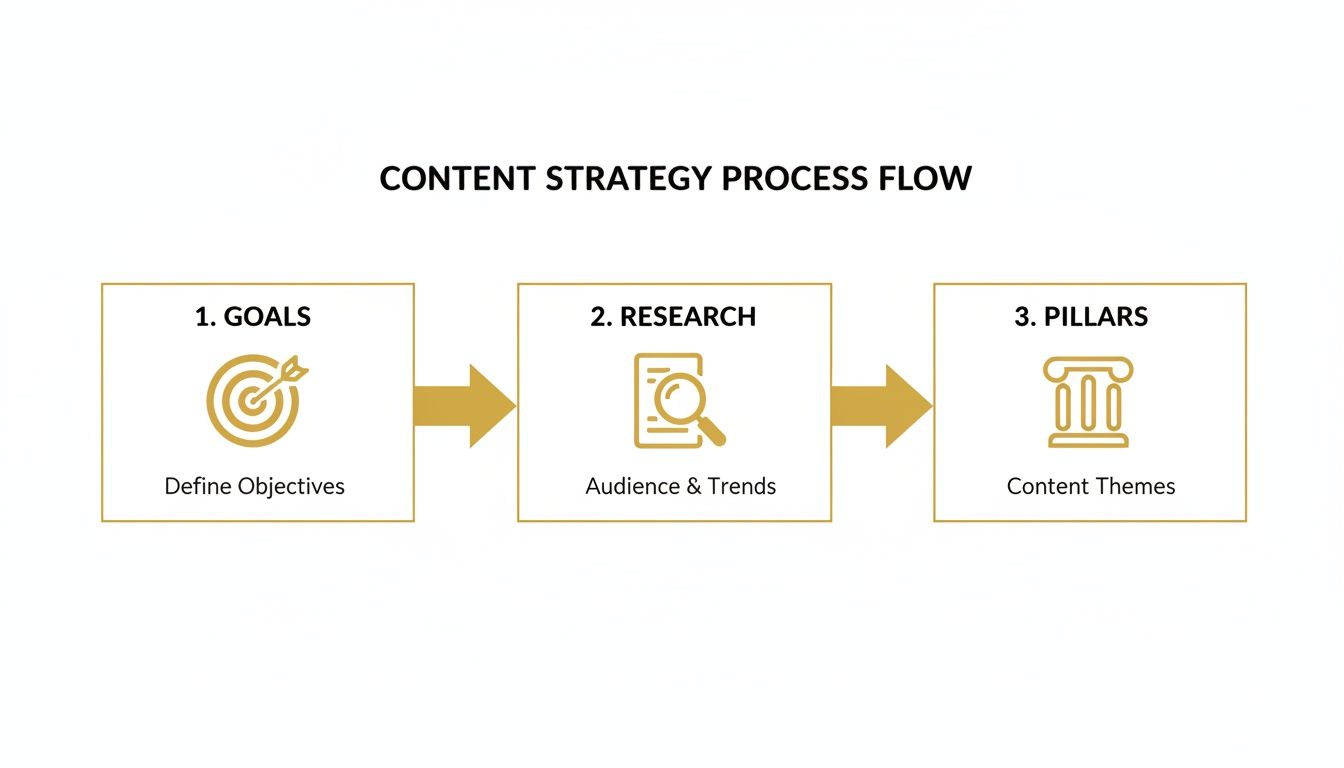
Strategic Foundation: This is your North Star. It's where you define clear business goals, get laser-focused on who your audience really is, and map out the core content themes that will guide every single piece you create. Without this, you’re just making noise.
Efficient Systems: This is the operational "how." It’s all about designing workflows that actually work, assigning clear roles and responsibilities, and using standardized templates and briefs so there’s no room for guesswork.
Smart Technology: These are your force multipliers. The right tools, especially AI, are absolute game-changers. For instance, a platform like PhotoMaxi can take a single product photo and generate an entire campaign’s worth of on-brand images and videos. That right there solves one of the biggest production headaches.
Quality Governance: This is your brand's immune system. It’s a mix of a rock-solid style guide, a practical editorial review process, and performance checklists to ensure every piece of content that goes out the door is top-notch.
Performance Measurement: This is how you prove it's all working. You need to track the right metrics, understand your content's ROI, and use that data to make your next move even smarter.
Scaling content successfully means shifting your mindset from being a creator to being an architect of a content system. The system does the heavy lifting, so your team can focus on creativity and strategy.
Setting Your Content Scaling Strategy
Trying to scale content without a clear strategy is a recipe for chaos. It’s like trying to build a skyscraper without a blueprint—you might get a few floors up, but the whole thing will be wobbly, inefficient, and eventually come crashing down. Before you even think about hitting the accelerator, you need a solid roadmap that connects every single piece of content to a real business outcome.
This means we have to stop chasing vanity metrics like page views or social media likes. Sure, they feel good, but they don't pay the bills. A truly scalable strategy is laser-focused on goals that directly impact the bottom line: generating qualified leads, boosting customer retention, or driving more trial sign-ups.
For instance, instead of a vague goal like "increase blog traffic," a smart, strategic goal is "increase blog-driven demo requests by 20% this quarter." That simple change in perspective forces you to create content that doesn't just attract eyeballs but actually guides visitors toward a conversion.
Get to Know Your Audience—Really Well
You can't create content that hits home if you have no idea who you're talking to. To scale effectively, you have to move beyond fuzzy demographics and build out detailed user personas. These aren't just fluffy marketing exercises; they are practical, everyday tools that ensure every asset you create speaks directly to your ideal customer’s problems, goals, and nagging questions.
A genuinely useful persona includes:
- Their Job & Day-to-Day: What does their typical workday actually look like?
- Primary Goals: What are they trying to accomplish in their role? What does success look like for them?
- Biggest Headaches: What's standing in their way? What keeps them up at night?
- Content Habits: Where do they hang out online to find information? Are they watching videos, reading articles, or listening to podcasts?
From there, mapping the customer journey is the natural next step. You need to understand the questions they have at every stage, from the moment they realize they have a problem to when they're seriously considering your solution and finally making a decision. This map becomes your content playbook, ensuring you're creating the right assets to meet them exactly where they are.
Define Your Content Pillars
One of the most effective techniques I've ever used for scaling content is the content pillar model. The idea is to identify a handful of broad, high-value topics that are absolutely central to your brand and your audience. Think of these as your content "hubs."
A pillar is a big, beefy piece of content—maybe it's a massive ultimate guide, a proprietary research report, or a comprehensive webinar. Once you have this single pillar, you can "atomize" it, breaking it down into dozens of smaller, bite-sized assets. This "hub-and-spoke" system lets you squeeze every last drop of value out of your initial research and effort.
A single, well-researched pillar can fuel your content calendar for an entire month—or even longer. It’s the ultimate way to work smarter, not harder.
Let's say your pillar is "The Ultimate Guide to AI-Powered Product Photography." Here's just a sample of how you could atomize it:
- Blog Posts: Spin off separate articles like "How to Keep Your Brand Consistent with AI," "Top 5 AI Tools for E-commerce Visuals," or "AI Models vs. Traditional Photoshoots: A Cost Breakdown."
- Social Media Content: Create Instagram carousels showing stunning before-and-after AI images. Film short TikToks or Reels that demonstrate a key feature in action.
- Email Newsletter: Drip out a multi-part series to your subscribers, where each email dives into a different chapter from the main guide.
- Infographic: Visualize the most compelling stats and processes from your report. This makes for perfect, shareable content on platforms like Pinterest and LinkedIn.
Using this method keeps your messaging consistent across every channel while making it ridiculously efficient to fill your content pipeline. For a closer look at the tech side, our guide on the best AI tools for marketing teams shows how technology can supercharge this whole process.
Audit Your Current Strategy
Before you start building something new, it’s wise to take stock of what you already have. A quick content audit can reveal some surprisingly easy wins and show you where the gaps are.
Run through this quick checklist to see where you stand:
| Area of Audit | Question to Ask | Action if "No" |
|---|---|---|
| Goal Alignment | Are my content goals tied to specific business metrics (like leads or sales)? | Redefine goals to focus on business outcomes, not vanity metrics. |
| Audience Clarity | Do I have documented user personas and journey maps? | Time to do some audience research and create practical personas. |
| Pillar Content | Have I identified 3-5 core content pillars for my brand? | Brainstorm and validate the core topics your brand can truly own. |
| Content Repurposing | Do I have a system for turning big assets into smaller ones? | Pick one existing long-form piece and challenge yourself to break it into 5 smaller assets. |
Finishing this audit gives you a clear, honest starting point. It helps you patch the biggest holes in your current approach so that when you do start to scale, your efforts are built on a rock-solid foundation.
Designing Repeatable Content Workflows
If your strategy is the road map, then your workflow is the engine that actually gets you there. This is where the real work of scaling happens—turning great ideas into published content through a system that’s predictable, efficient, and, most importantly, repeatable.
Without a solid workflow, you’re just reinventing the wheel every single time you create something new. That’s not scaling; it’s a recipe for burnout and bottlenecks.
The goal here is to build a content assembly line. Everyone on the team needs to know their exact role, what they’re responsible for, and what happens next. When that clarity exists, the constant "what's the status on this?" emails and Slack messages disappear, and your team can just create.
Define Roles and Responsibilities
Scaling content means getting hyper-specific about who does what. Any ambiguity here is a direct threat to your efficiency. When people aren't sure who owns a task, things inevitably fall through the cracks.
The best way to solve this is to map out every single step of your content’s journey, from a rough idea to a published piece, and assign a clear owner to each stage.
- Content Strategist: This person owns the why. They’re responsible for topic ideation, keyword research, and making sure every piece of content supports your bigger business goals.
- Writer/Creator: They own the first draft. Their job is to take the brief and turn it into a compelling narrative, script, or storyboard.
- Designer/Visual Specialist: They own the look and feel. This could involve anything from creating custom graphics to using a tool like PhotoMaxi to generate high-quality, on-brand visuals. We have a great guide on how to generate photos with AI if you want to dive deeper.
- Editor/Reviewer: This is your quality control. They’re the final check for grammar, brand voice, and factual accuracy before anything goes live.
- SEO Specialist: They own optimization. Their focus is on making sure the content is set up to rank, handling everything from metadata to internal linking.
When roles are this clearly defined, it builds a culture of accountability. Team members can focus on what they do best, which speeds up the entire process and boosts the quality of the final product.
Create a Bulletproof Content Brief
A vague idea almost always leads to a messy, time-consuming project. On the flip side, a detailed content brief is the blueprint for a smooth and efficient one. It's the single source of truth that aligns everyone involved and kills the guesswork that leads to endless revisions.
A great content brief doesn't just tell a creator what to make; it tells them why it matters, who it's for, and what success looks like. It's the most important document in your entire workflow.
Your brief should be a non-negotiable part of the process. Here’s what every single one should include:
| Brief Component | Purpose |
|---|---|
| Target Persona | Specifies exactly who the content is for. |
| Primary Keyword | Defines the main SEO focus for the piece. |
| Core Angle/Hook | Outlines the unique perspective or main takeaway. |
| Key Talking Points | Lists the essential subtopics that must be covered. |
| Call to Action (CTA) | Clarifies the next step you want the reader to take. |
| Internal Linking Goals | Suggests other relevant content to link to. |
A standardized brief like this means every creator—whether they’re in-house or a freelancer—gets the same clear instructions every time. That’s how you get consistent, on-target results.
Batch Your Tasks for Maximum Efficiency
Context switching is the silent killer of productivity. Every time someone on your team has to jump from writing, to designing, to editing, and back again, they lose focus and momentum. The fix? Task batching. It’s simple: group similar tasks together and knock them out in dedicated, focused blocks of time.
Instead of tackling one blog post from start to finish before moving to the next, think about structuring your week by function.
- Monday: Keyword research and content briefing day.
- Tuesday: Writing day. All first drafts get done.
- Wednesday: Visuals day. This is where you can get incredible leverage from AI tools. In just one afternoon, you could use a platform like PhotoMaxi to generate a whole month’s worth of social media images.
This kind of systematic approach, from setting goals to defining your core content pillars, is the foundation of a workflow that can truly scale.
This process becomes even more critical with the explosion of AI in content creation. The numbers don't lie: generative AI adoption in organizations more than doubled from 33% in 2023 to 71% in 2024. Teams are reporting an average 40% productivity boost, with marketers saving about 3 hours on every single piece of content they produce. These stats are a clear signal that structured, repeatable workflows are no longer a "nice-to-have"—they're essential for taking full advantage of the efficiency gains modern tools offer.
Weaving in AI and Templates for Breakneck Speed

Solid systems get you organized, but the right tech stack is what gives you real leverage. This is the part where you shift from simply working harder to working smarter, letting technology handle the grunt work so your team can focus on what they do best: strategy and creative thinking.
The goal isn't just to adopt tools for the sake of it. It’s about building a smart tech stack where AI and templates take on the most repetitive, soul-crushing parts of content creation. Think generating first drafts, brainstorming ideas, or creating a whole month's worth of on-brand visuals. This is how you achieve serious scale without burning out your team or your budget.
Supercharging Visuals with AI Generation
Let's be honest: visual content is king, but it’s historically been the biggest bottleneck. Photoshoots, models, locations, and endless editing cycles are slow, expensive, and a nightmare to scale.
AI-powered visual generation tools flip this entire script.
Picture an e-commerce brand launching a new handbag. The old way involved a week-long photoshoot. The new way? They upload a single, clean product shot to a platform like PhotoMaxi.
From that one image, they can spin up an entire campaign's worth of assets in an afternoon.
- Pristine Studio Shots: Perfect, high-res product photos on any background you can imagine.
- Authentic Lifestyle Images: The handbag being carried by a consistent, AI-generated model in different settings—from a bustling city street to a quiet café.
- Engaging Social Videos: Short, dynamic clips of the AI model showing off the bag, ready for Reels or TikTok.
A huge frustration I've seen with early AI image tools is the lack of consistency. Getting the same face, style, or product to show up correctly across dozens of images was nearly impossible. Thankfully, more advanced platforms are built specifically to solve this, letting you lock in character and brand consistency—which is absolutely critical for building a recognizable brand.
This isn't just about saving time and money, though the savings are massive. It’s about unlocking a level of creative freedom that was unthinkable a few years ago. You can test different aesthetics, target niche audiences with custom visuals, and refresh your creative assets weekly, not just quarterly.
Manual vs AI-Powered Visual Content Creation
To really grasp the difference, let's compare the old way of doing things with a modern, AI-augmented workflow.
| Stage | Traditional Manual Workflow | AI-Augmented Workflow (with PhotoMaxi) |
|---|---|---|
| Concept & Planning | 1-2 weeks: Brainstorming, mood boards, hiring talent, scouting locations. | 1-2 hours: Ideation with AI, selecting AI models and digital environments. |
| Asset Creation | 3-5 days: Full-day photoshoot, setup, travel, and tear-down. | 2-4 hours: Uploading a product image and generating dozens of variations. |
| Post-Production | 1-2 weeks: Photo selection, retouching, color grading, and video editing. | Under 1 hour: Minor AI-assisted touch-ups and final asset selection. |
| Cost | $5,000 - $25,000+ per campaign. | $50 - $300 per month subscription. |
| Flexibility | Low. Reshoots are expensive and time-consuming. | High. Generate new concepts and variations instantly and affordably. |
The contrast is stark. An AI-powered approach dramatically compresses timelines and slashes costs, all while giving your team more creative shots on goal.
AI as Your Writing Co-Pilot
The blank page is intimidating. AI writing assistants are incredible for getting past that initial hurdle, acting as a creative partner to kickstart the drafting and ideation process.
This isn't about replacing writers; it's about making them more powerful. A writer can feed an AI a primary keyword and get a detailed outline in return. They can drop in a content brief and get a rough first draft to react to. They can even brainstorm a dozen unique headlines in the time it takes to make coffee.
The human touch is still what makes content great—adding unique insights, refining the tone, and fact-checking. By letting AI handle the initial heavy lifting, your writers can pour their energy into the high-level, nuanced work that truly connects with an audience.
Building a Library of Reusable Templates
Templates are the secret weapon of any team serious about scale. They create a standardized framework for your most common content formats, which locks in brand consistency and makes production ridiculously fast.
Instead of starting from a blank canvas every single time, your team pulls up a pre-approved, structured document with all the core elements ready to go. You should have templates for everything you create on a regular basis.
- Blog Post Template: Include pre-built sections for the intro, key talking points, SEO metadata, and a call-to-action.
- Email Newsletter Template: Pre-format the header, content blocks, and footer for quick drag-and-drop assembly.
- Social Media Carousel Template: Design a multi-slide layout in Canva or Figma with your brand's fonts and colors, ready for new text and images.
This simple practice guarantees a baseline of quality and consistency, no matter who on the team is creating the asset. If you're looking to build out your tech stack, it’s worth exploring some of the best AI tools for content creation that are helping teams like yours get more done.
The shift is already happening. A recent survey found that 53% of B2B marketers are now using AI for images and videos. Digging deeper, 63% of video pros are applying AI in their creation or editing, which is helping push content like blog posts into the top five for ROI at an impressive 22.26%. You can find more data like this in these powerful content marketing statistics.
Automating Distribution and Measuring ROI
Look, creating a flood of high-quality content is a huge win, but it’s only half the battle. If that content just sits on your blog or YouTube channel without anyone seeing it, you've built a powerful engine that's stuck in neutral.
The real magic happens when you pair scaled production with smart distribution and a ruthless focus on measurement. This is how you turn high volume into predictable, tangible growth for the business. Without it, you're just making noise in a vacuum.
Build Your Automated Distribution Engine
Manually pushing every single piece of content to every channel is a soul-crushing, time-consuming task. It’s the fastest way to burn out your team and kill all the momentum you’ve built. This is where automation tools become your best friend, letting you build a distribution system that works for you 24/7.
The goal is to get your content in front of the right eyeballs at the right time, with as little manual button-pushing as possible. This frees up your team to do what humans do best: engage with the community, analyze results, and plan the next strategic move.
Your distribution strategy should be just as templated and repeatable as your creation process. Don't just publish content; launch it with a coordinated, multi-channel push that maximizes its initial impact.
Here’s a practical checklist to get your automated, multi-channel distribution humming:
Social Media Schedulers: Grab a tool like Buffer or Hootsuite to schedule posts across LinkedIn, X, Instagram, and Facebook. I always recommend prepping 3-5 variations of copy and visuals for each platform to keep the content feeling native and fresh over time.
Email Marketing Automation: Use your email platform to automatically share new pillar content. You can set up a simple RSS-to-email campaign that pings your list whenever a new blog post goes live, or create a more curated weekly digest that bundles your best stuff.
Content Syndication: For your big, cornerstone assets, look into networks like Outbrain or Taboola. These platforms can get your content featured on major publications, tapping into audiences you’d never reach on your own.
Employee Advocacy: Make it ridiculously easy for your own team to share company content. A tool like GaggleAMP works great, but even a dedicated Slack channel with pre-written posts can do the trick. The key is to make it a one-click process.
Measuring What Matters: Connecting Content to ROI
As you start pumping out more content, leadership will inevitably ask, "Is all this working? What's the return on our investment?" To answer that question confidently, you have to get past vanity metrics like page views or likes.
You need to connect the dots between the content people consume and the revenue they generate. This is how you justify your budget, prove your team's value, and get the resources to scale even further.
Your Core ROI Metrics
Don't drown yourself in a sea of data. I’ve found that focusing on a handful of key performance indicators (KPIs) is what tells the clearest story about your content's financial impact.
Conversion Rate: This is the big one. What percentage of people who read a blog post or watch a video end up taking a valuable action? This could be signing up for a trial, requesting a demo, or buying a product. You can track this easily by setting up goals in Google Analytics.
Cost Per Acquisition (CPA): Plain and simple, how much money does it take to get a new customer through your content? Calculate it by dividing your total content marketing spend (salaries, tools, freelance budget) by the number of new customers attributed to content channels.
Customer Lifetime Value (CLV): This tells you the long-term value of the customers you bring in. Does your content attract high-value clients who stick around and spend more over time? By connecting your CRM data to your analytics, you can prove that content isn't just bringing in leads, it's bringing in the right leads.
Sales Cycle Length: Can you prove that leads who engage with your content close faster? Track the time it takes for a content-qualified lead to move through the sales pipeline versus a non-engaged lead. Showing you can shorten the sales cycle is a direct impact on sales efficiency and a huge win.
To make all this happen, you need a few tools working in concert. Google Analytics is your foundation for on-site behavior. Your CRM (like HubSpot or Salesforce) is what links content activity to actual deals. And a visualization tool like Google Data Studio can pull it all together into simple, digestible reports that clearly show your content's incredible impact on the bottom line.
Frequently Asked Questions About Scaling Content
Even with the best playbook, you're bound to have questions when you start overhauling your content process. Learning how to scale content production is a journey, and hitting a few bumps is just part of the process. Let's tackle some of the most common questions we hear from teams just like yours.
How Do I Maintain Quality When Scaling Content Creation?
This is always the first question, and for good reason. It feels like a paradox: how can you create more without sacrificing the quality that got you here? The answer isn't working harder; it's working smarter with rock-solid systems.
The key is building your quality control and governance framework before you hit the gas on production. Start with a crystal-clear brand style guide. This isn't just about logos and colors; it needs to cover everything from tone of voice and grammar specifics to the feeling your visuals should evoke. This document is your North Star.
Then, you need to standardize your inputs. Every piece of content, no matter how small, should start with a detailed brief. This kills ambiguity and makes sure everyone—from writers to designers—is on the same page from the get-go.
Finally, layer in a multi-stage review process. It could be as simple as:
- A quick peer review for a gut check and initial feedback.
- A formal editorial review to nail brand voice, clarity, and flow.
- A final SEO or compliance check right before it goes live.
Remember, quality at scale comes from strong systems, not just more effort. Your templates, briefs, and review loops are your best defense against churning out a sea of mediocre, off-brand content.
What Are the First Steps for a Small Team with a Limited Budget?
If you're a small team, "ruthless prioritization" is your new mantra. You don't need a massive budget to see big results from scaling; you just need to be incredibly strategic with every dollar and every hour.
First, forget trying to be everywhere. Pinpoint the one channel that already drives the most results for you and pour your energy into dominating it. Is it your blog? Your LinkedIn? Go all-in there.
Next, become a master of repurposing. The idea is to create one major "pillar" piece of content—think a comprehensive guide or a webinar—and then slice and dice it into 10-15 smaller assets. That one guide can become a dozen social media posts, a short video script, an infographic, and a newsletter series.
And of course, lean on affordable, high-impact tools. AI writers can be great for brainstorming and getting a first draft on the page. For visuals, a tool like PhotoMaxi is a game-changer. You can generate a whole batch of professional-looking images from a starter plan, skipping the cost and complexity of a photoshoot entirely.
How Much of the Process Can Realistically Be Automated?
You'd be surprised. We see teams successfully automate around 60-70% of their end-to-end content workflow, especially the repetitive tasks that kill creativity.
Think about what you can offload:
- Initial Draft Creation: Using AI to generate the first pass on articles, ad copy, and scripts.
- Visual Asset Generation: Creating entire campaign visuals in minutes with tools like PhotoMaxi.
- Content Distribution: Scheduling all your social media and email newsletters in one go.
- Performance Reporting: Setting up dashboards that automatically pull in your KPIs.
The magic, however, lies in the 30-40% that remains human. This is where your team's unique expertise shines. Strategy, deep audience research, the final polish on an article to perfect the brand voice, and building real relationships with your community—those are things you can't, and shouldn't, automate. The best systems use a hybrid model: let the machines handle the grunt work so your team can focus on the high-impact, creative thinking that truly moves the needle.
Ready to eliminate your biggest content bottleneck and generate stunning visuals in minutes? With PhotoMaxi, you can create an entire campaign’s worth of on-brand images and videos from a single photo. Stop spending weeks on photoshoots and start creating at the speed of AI. Explore what you can create with PhotoMaxi today.
Related Articles


Ready to Create Amazing AI Photos?
Join thousands of creators using PhotoMaxi to generate stunning AI-powered images and videos.
Get Started Free