
AI for Video Creation A Guide to Faster Smarter Content
AI for video creation is pretty much what it sounds like: using artificial intelligence to make or edit video, often starting with nothing more than a text description or a single photo. Think of it as your own digital film crew, ready to handle the complex stuff so you can focus on the creative vision—no technical expertise or massive budget required.
The New Frontier of Video Production
Imagine having a director, camera operator, editor, and special effects wizard all on call, 24/7, ready to turn your ideas into reality in just a few minutes. That’s the promise of AI for video creation, and it’s completely flipping the script on how video gets made. It represents a massive departure from traditional video workflows, which have always been notoriously slow, expensive, and demanding.
Not long ago, making even a short promo video meant shelling out for expensive gear, hiring a skilled crew, and spending weeks coordinating everything. This put high-quality video out of reach for most small businesses and independent creators. AI tools are tearing down those barriers for good.
Solving Core Industry Challenges
What makes this technology so powerful is its ability to solve some of the oldest headaches in the video production world. Instead of spending thousands on a single shoot, you can now generate a whole library of on-brand video clips for a tiny fraction of the cost.
Here are the key problems AI is solving right now:
- High Production Costs: It gets rid of the need for physical sets, fancy cameras, and big production teams, which immediately slashes your budget.
- Slow Turnaround Times: AI can create and edit video clips in minutes. Projects that used to take weeks can now be knocked out in an afternoon.
- Scalability Issues: Pumping out a steady stream of consistent, high-quality content for different platforms is a huge challenge. AI automates this, letting you produce endless variations of your video assets without breaking a sweat.
This isn’t just some niche trend; it’s driving huge market growth. The global AI video generator market was valued at around USD 554.9 million in 2023 and is expected to rocket to nearly USD 1.96 billion by 2030. That kind of growth tells you just how badly businesses need faster and more affordable ways to create content in a world that runs on video. You can dig into the numbers in this Fortune Business Insights report.
From a Single Image to a Full Campaign
New platforms like PhotoMaxi are leading the charge. They give users the ability to generate entire cinematic scenes starting from just one image. Once you create a consistent digital model—say, of a person or a product—you can generate countless shots in any style, setting, or pose. From there, you can instantly turn those static images into dynamic video clips.
Think of it this way: traditional video production is like building a car from scratch for every single trip. AI video creation is like having a fleet of self-driving cars, ready to go anywhere you command, instantly.
This new workflow opens up a whole new world of creative possibilities. Whether you're a marketer trying to build a social media campaign, an e-commerce store making product videos, or a creator telling a unique story, AI gives you the tools to bring your ideas to life quickly. It's no longer a game of who has the biggest budget—it’s about who has the best ideas.
To really understand the difference, let's break down the old way versus the new way.
Traditional Video Production Versus AI Video Creation
The table below gives a high-level look at how AI is fundamentally changing the video production process, making it faster, cheaper, and more accessible.
| Aspect | Traditional Video Production | AI Video Creation |
|---|---|---|
| Initial Concept | Requires detailed storyboards, scripts, and shot lists. | Can start with a simple text prompt or a single image. |
| Resources | Needs physical locations, actors, crew, and expensive equipment. | Primarily requires a computer and an AI software subscription. |
| Timeframe | Weeks or months for planning, shooting, and post-production. | Minutes or hours from concept to final video. |
| Cost | High, often running from thousands to millions of dollars. | Low, typically a monthly subscription fee. |
| Revisions | Time-consuming and expensive reshoots or re-edits. | Fast and easy; just tweak the prompt and regenerate. |
| Scalability | Difficult and costly to produce content variations at scale. | Effortless to create unlimited variations for A/B testing or different platforms. |
Ultimately, the shift from traditional to AI-driven video isn't just about saving money or time. It's about empowering a new generation of creators to tell their stories without the old barriers getting in the way.
How AI Video Generation Actually Works
To really get what's happening with AI for video creation, you have to pull back the curtain and look at the tech doing all the heavy lifting. These aren't just abstract concepts; they're the engines driving a huge creative shift. Think of them less like complex code and more like different artistic techniques the AI uses to turn an idea into reality.
At the center of it all are foundational models trained to understand and generate content. When it comes to video, the two big players you'll hear about most are Diffusion Models and Generative Adversarial Networks (GANs).
The Sculptor and The Critic
Let's break these down with a simple analogy.
Imagine a sculptor who starts with a block of marble. A Diffusion Model works a lot like that, but its "marble" is just a screen of random digital noise—like TV static. The AI has been shown millions of videos and images, so it knows what a cat, a car, or a sunset should look like. It then carefully chips away at the noise, step by step, refining the static until a clear picture or video clip emerges that matches what you asked for.
A Generative Adversarial Network (GAN), on the other hand, is more like an artist and an art critic working together in a competitive loop.
- The Generator (The Artist): This part of the AI creates an image from scratch, doing its best to make it look completely real.
- The Discriminator (The Critic): This part’s job is to look at the generated image and decide if it's a fake.
The two go back and forth, sometimes thousands of times per image. The artist gets better at fooling the critic, and the critic gets better at spotting fakes. This constant competition is what pushes the AI to produce incredibly realistic results. While GANs were foundational for a long time, many of the newer tools favor Diffusion Models because they tend to be more stable and produce consistently high-quality video.
Core AI Video Creation Methods
These underlying technologies power a few key methods for making video content. Each one is a different tool in the toolbox, designed for turning specific types of input into motion.
Text-to-Video: This is the most straightforward approach. You write a descriptive prompt—something like, "a drone shot flying over a futuristic city at sunset"—and the AI generates a brand-new video clip based on your words. It’s perfect for creating scenes that exist only in your imagination.
Image-to-Video: This technique takes a still image and brings it to life. You could upload a photo of a person and prompt the AI to make them smile, talk, or glance around the room. It's a fantastic way to animate portraits or add subtle motion to existing graphics.
Video-to-Video: With this method, you start with an existing video clip and use a prompt to completely change its style or content. You could transform a live-action clip of someone walking into an animated cartoon, or change a scene from a sunny summer day to a snowy winter evening.
At its core, AI video generation is about teaching a machine the language of visuals. It learns the relationship between words, images, and motion, allowing it to translate a simple text command into a complete, moving scene.
The image below gives a great visual of how these technologies deliver on three key promises: lower costs, faster speed, and greater scale.
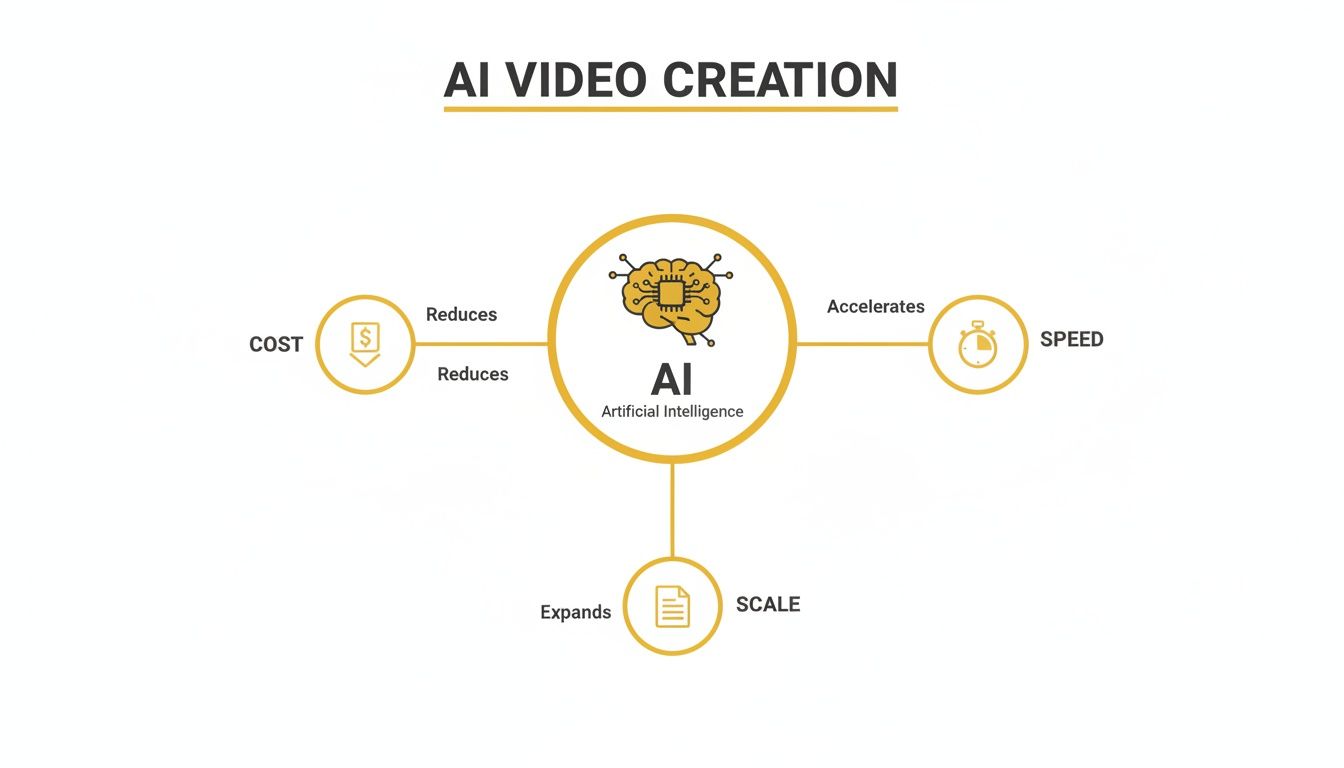
This map shows how AI acts as a central brain to make the entire production process more efficient. By automating tasks that used to be incredibly complex and time-consuming, these models are making professional-quality video accessible to just about anyone.
The real game-changer, though, is when these models are trained for consistency. If you want a deeper dive, check out our guide on how to create AI models that can be reused across countless scenes. That’s the secret to building a cohesive story or maintaining a consistent brand look and feel.
Real-World AI Video Applications That Drive Growth
The theory behind AI video is impressive, but its real value shines when you see it in action. This isn't just about cool tech; it's about solving real-world business problems and unlocking creative avenues that were once too expensive or time-consuming. Let's dig into some practical examples of how AI video tools are already helping businesses and creators get ahead.
From small e-commerce shops to major social media influencers, AI is leveling the playing field. It’s making high-quality, scalable video production something anyone can access. These aren't just ideas for the future—they're what smart brands are doing right now to grab attention and grow their revenue.
E-Commerce Product Videos on Demand
For any online store, a great product video can easily turn a window shopper into a buyer. The problem? Creating unique videos for hundreds or thousands of products is a logistical and financial nightmare. It’s often just not feasible.
Picture a Shopify store that sells custom t-shirts. Instead of hiring models, booking a studio, and doing a massive photoshoot for every new design, they can now just upload a flat image of the t-shirt. An AI platform takes that image and wraps it onto a consistent digital model, then generates a whole suite of video clips. Suddenly, you have videos showing the shirt from every angle, in different virtual locations, all with realistic movement.
This changes everything for e-commerce brands:
- Massive Cost Reduction: You're cutting out the costs of models, photographers, studio rentals, and editing crews for each product.
- Unmatched Speed: What used to be a weeks-long production process now takes a few hours. That means new products can go live almost instantly.
- Virtual Try-Ons: Some tools can even show the same shirt on different AI-generated body types, helping customers visualize the fit and click "buy" with more confidence.
By turning a static product photo into a living, breathing video, e-commerce stores can build an engaging shopping experience that was completely out of reach before. The impact on the bottom line is immediate.
Social Media Content Creation at Scale
If you're a content creator on a platform like TikTok or Instagram, you know the grind. The pressure to churn out fresh, high-quality video content every single day is intense. And if you’re the face of your brand, being on camera for all of it can be draining. This is where AI video becomes a game-changer.
Think about a fitness influencer. They can upload a handful of selfies to an AI tool to create a digital version of themselves—an AI twin that looks just like them. This ensures their personal brand stays consistent across all their content.
With this digital persona ready to go, the creator can generate a month's worth of videos in an afternoon. They can create clips of their AI twin demonstrating workouts, sharing motivational tips from a scenic (and virtual) beach, or modeling a new line of athletic wear. All without ever setting up a camera. This workflow for an AI generated video from image asset frees up an enormous amount of time.
This isn't about replacing the creator; it's about empowering them. They can spend less time on the tedious parts of filming and more time on strategy, creative ideas, and engaging with their community.
Hyper-Personalized Marketing Campaigns
Every marketer dreams of running ad campaigns that feel like they're speaking directly to each customer. But producing unique video ads for dozens of different audience segments has always been wildly impractical. AI finally makes this level of personalization possible at scale.
Take a travel company. They can design one core video ad concept and then use AI to spin up hundreds of variations. One version for a younger audience might feature their AI actor exploring a vibrant city nightlife scene. Another, aimed at families, could show that same actor relaxing on a peaceful beach.
The AI can then customize each version with different voiceovers, text, and calls to action. This makes A/B testing incredibly powerful, helping the company figure out exactly what resonates with each group and put their ad spend where it counts. The end result is a marketing campaign that feels far more personal and drives much higher engagement.
Here's a quick look at how these applications translate to direct business benefits.
AI Video Applications And Their Business Impact
| Use Case | Target Audience | Key Benefit |
|---|---|---|
| E-Commerce Videos | Online Retailers, Shopify Merchants | Boosts conversion rates and reduces product photography/videography costs significantly. |
| Social Media Content | Influencers, Content Creators | Dramatically increases content output and consistency with less time spent filming. |
| Personalized Ads | Marketing Teams, Ad Agencies | Improves ad relevance and campaign ROI by tailoring video creative to specific segments. |
| Corporate Training | HR & L&D Departments | Creates engaging and scalable training modules with AI presenters, saving on production time. |
| Virtual Try-On | Fashion & Beauty Brands | Reduces return rates by giving customers a more accurate idea of how a product will look. |
Ultimately, these examples show that AI video isn't just a novelty. It's a practical tool that helps businesses work smarter, create better customer experiences, and achieve measurable growth.
Weaving AI Into Your Video Production Workflow
The idea of shifting to an AI-driven workflow can sound intimidating, but today's tools are built to feel more like a creative collaborator than a piece of complex software. Think of it less as replacing your entire process and more as supercharging it. What once took weeks of painstaking production can now be accomplished in just a few hours.
Let's walk through how a typical project unfolds in this new reality.
The whole process hinges on a simple, powerful concept: take one great asset and multiply its potential endlessly. It’s a workflow that delivers both creative agility and serious efficiency.
Step 1: Create Your Consistent Digital Actor
Everything starts with a single, high-quality asset. Forget about the logistics of casting models and booking photoshoots. All you really need is one clean image of a person or even a product.
You start by uploading this source image to a platform like PhotoMaxi. The AI gets to work analyzing key features—like facial structure, expressions, and overall style—to generate a reusable digital model. This model becomes your consistent "digital actor," ensuring the exact same likeness appears flawlessly in every single shot you generate.
This first step is absolutely crucial for maintaining brand consistency. By creating a reliable digital persona, you sidestep one of the biggest frustrations with AI: faces that change from one scene to the next. For professional storytelling, that consistency is non-negotiable.
Just like that, you've replaced the entire pre-production scramble of casting, location scouting, and scheduling. The time and budget savings start adding up from the very beginning.
Step 2: Generate Your Core Visual Assets
With your digital actor ready to go, you step into the director's chair. This is where you build out your library of scenes, guiding the AI with simple text prompts to create exactly what you envision. You can generate hundreds of studio-quality shots without ever picking up a camera.
Think of it like briefing your own personal photographer. You have full creative control over every detail:
- Pose and Action: "A full-body shot of the person jogging across a city bridge at dawn."
- Location and Setting: "A close-up portrait in a cozy, dimly lit coffee shop."
- Style and Mood: "A dramatic, black and white cinematic shot with high contrast."
- Outfit and Props: "Wearing a red business suit and holding a tablet."
Within minutes, the AI returns a batch of high-resolution images that match your descriptions, all featuring your consistent digital actor. This is your chance to experiment freely—generate variations for A/B testing or build a diverse set of visuals for a big campaign. To get a feel for what's out there, checking out some of the best AI tools for content creation can spark some great ideas.
Step 3: Animate Images Into Cinematic Video
Now that you have a library of beautiful still images, it's time to bring them to life. Welcome to the image-to-video stage, where static shots become dynamic, moving sequences.
You simply pick one of your generated images and give the AI another prompt, this time describing the motion you want to see. The system intelligently animates the scene, adding subtle, realistic movements that follow your creative direction.
- For a portrait: You could prompt, "Make the person slowly smile and turn their head slightly to the right."
- For an action shot: You might try, "Add subtle breathing motion and wind blowing through their hair."
This step produces short, polished video clips that act as the building blocks for your final video. You can create dozens of these clips from your image library, giving you a ton of footage to work with in the final edit.
Step 4: Refine and Polish Your Final Output
The final stretch is all about assembly and refinement. The best AI platforms include built-in editing suites, so you can handle all the post-production tasks without ever leaving the app.
This is where you bring it all together:
- Editing and Sequencing: Arrange your clips on a timeline to build your story.
- Upscaling: Boost the resolution of your video to make sure it looks sharp and professional on any screen, from a phone to a 4K display.
- Relighting: Tweak the lighting of a scene after it's been generated to perfect the mood or ensure it matches the other clips in your sequence.
By bringing these tools under one roof, the platform becomes an all-in-one production studio. This last bit of polish ensures your AI-generated video meets professional standards and is ready to be published.
What AI Video Does Well (And Where It Still Stumbles)
It’s easy to get swept up in the excitement around AI video, but let’s get real for a moment. This technology is a powerhouse, but it’s not magic. Like any tool, it has its brilliant strengths and some very real limitations you need to know about.
Having a clear-eyed view of both sides is crucial. It helps you figure out where AI can genuinely supercharge your workflow and where you might still need a more traditional approach. Think of it less as a replacement for everything and more as an incredible new paintbrush in your creative toolkit.
The Game-Changing Benefits of AI Video
The upsides are pretty staggering, especially if you've ever been stuck behind the high walls of traditional video production costs and timelines. AI is knocking those walls down.
For starters, the cost savings are massive. Forget about renting studios, hiring actors, or booking expensive camera gear. What used to cost a small fortune can now be done for the price of a software subscription. This is huge for small businesses, indie creators, and marketers who need to do more with less.
Then there’s the speed. You can go from a simple idea typed into a prompt box to a finished video clip in a matter of minutes. This isn't just about working faster; it's about being more agile. You can jump on a trend, A/B test a dozen ad concepts, or get a timely message out without waiting weeks for a production team.
And when it comes to scale, AI is in a league of its own.
- Limitless Variations: Need ten different versions of a product video for different audiences? No problem. Generate them all without a single reshoot.
- Boundless Creativity: You can bring impossible scenes to life. Think historical reenactments, fantastical worlds, or abstract visual metaphors that would be a logistical nightmare to film.
- Rock-Solid Consistency: AI tools are getting better at maintaining consistent characters and styles, ensuring your brand's visual identity stays intact across a whole series of videos.
This isn’t just a small step forward. The combination of lower costs, incredible speed, and massive scale fundamentally rewrites the rules of who can create high-quality video content.
Acknowledging the Current Hurdles
Now for the reality check. AI video is evolving at a breakneck pace, but it's not perfect. Anyone who has used these tools knows you can still run into some quirks.
One of the most common issues is dealing with digital artifacts—those weird little glitches where a background object subtly warps or a hand suddenly has six fingers. The models are getting smarter about this, but it’s still something to watch out for.
Another big challenge is capturing genuine human emotion. AI can create a photorealistic face, but nailing the subtle flicker of an eye or the complex micro-expressions that convey true feeling is incredibly difficult. Generated characters can sometimes feel a bit stiff or land in the "uncanny valley," where they're almost real, but something just feels off.
Finally, don't underestimate the technical demands.
- Heavy Lifting: Pushing out a crisp 4K video requires a ton of computing power. This can mean longer rendering times or higher costs on some platforms, especially for longer clips.
- The Art of the Prompt: Getting the exact shot you envision often takes more than one try. It can involve several rounds of refining your prompts and tweaking parameters to steer the AI toward your creative goal.
These aren't deal-breakers, but they are the current frontiers. Every month, the models get better, and these limitations become less pronounced. For now, knowing they exist is key to working with the technology effectively.
Common Questions About AI Video Creation
As you start digging into AI for video, you’re going to have questions. It's a field that's moving at a breakneck pace, and it’s smart to get a handle on the practical side of things before you jump in. Let's tackle some of the most frequent questions I hear, so you can move forward with confidence.
These aren't academic answers; they're designed to be straightforward and give you what you need to know about usage rights, keeping your visuals consistent, and what it really takes to get started.
Can I Use AI-Generated Videos For Commercial Projects?
The short answer is yes, absolutely—but this is one of those moments where you genuinely need to read the fine print. Your right to actually make money from AI-generated content hinges entirely on the terms of service of the platform you're using. Don't make the mistake of assuming all tools are the same, because that can lead to some nasty legal surprises down the line.
Most platforms have different tiers. A free plan might be great for experimenting, but it'll probably lock you into non-commercial use only. To use the videos in ads, for your brand's social media, or in products you sell, you'll need a paid or business-focused plan that explicitly grants you a commercial license.
Before you commit to any tool, hunt for clear language on these points:
- Commercial Use: Does it flat-out say you can use what you make for business?
- Copyright Ownership: Who owns the video when it's done? The best platforms will grant you full ownership or a broad, royalty-free license for anything you generate.
- Synthetic Media Policies: Get a feel for their rules on using AI-generated people and how they handle intellectual property.
Bottom line: Always, always choose a service that gives you unambiguous commercial usage rights. It protects your work and means you can build a marketing campaign or a whole business around your AI videos without looking over your shoulder.
How Does AI Maintain Character Consistency In Videos?
This is probably one of the most critical questions out there, because it's the difference between a fun novelty and a professional tool. We've all seen those AI videos where a person's face seems to subtly (or not-so-subtly) morph between shots. That flicker of inconsistency is a dead giveaway and makes it impossible to tell a coherent story or build a recognizable brand presence.
Keeping a character consistent from one frame to the next is a tough technical nut to crack. Your average text-to-video model often struggles because it treats each clip as a brand new creation, with no persistent "memory" of the character's face. The result is that jarring, uncanny look that immediately screams "AI-generated."
But more advanced platforms, like PhotoMaxi, are solving this by flipping the workflow on its head. Instead of generating from a blank slate every time, they take a completely different route:
- They Create a Digital Model: You start by giving the AI a few reference photos of a person. It then analyzes those images to build a detailed, reusable digital model that captures that person's unique likeness.
- They Generate from the Model: From that point on, every single image or video clip is generated using that specific model as a constant, unchanging reference point.
This model-based approach is what finally makes consistency possible. It ensures the same face, build, and style can be replicated reliably across dozens or even hundreds of different scenes. It's the key that unlocks professional narrative content, branded video series, or ad campaigns where your audience needs to recognize the main character every time.
What Skills Do I Need To Start Creating AI Videos?
One of the biggest myths floating around is that you need to be a coder, an animator, or a VFX artist to make AI videos. The reality is, the tools being built today are for creators and marketers, not for programmers. The barrier to entry has completely crumbled.
The most important skills you need are a strong creative vision and the ability to describe it. Your main job is to be the director. You guide the AI through descriptive text prompts, essentially giving instructions to a massive, incredibly fast production crew. The AI handles the heavy lifting; you provide the creative spark.
Sure, an experienced video editor can absolutely weave these tools into a more complex post-production pipeline, but a total beginner can get stunning results right out of the box with an intuitive interface. You don't need to understand the machine learning models any more than a photographer needs to understand the physics of a lens.
Instead, focus on honing these core creative skills:
- Clear Communication: Writing precise, descriptive prompts is your new superpower.
- Visual Storytelling: Know the story you want to tell and the feeling you want to create.
- An Iterative Mindset: Be ready to experiment, tweak your prompts, and try again to nail the perfect shot.
The days of needing a deep technical background to produce amazing video are over. With the right AI tool, your imagination is the only real prerequisite.
Ready to stop imagining and start creating? With PhotoMaxi, you can turn a single image into a consistent digital actor and generate entire cinematic sequences in minutes. Discover how PhotoMaxi can transform your video workflow today!
Related Articles


Ready to Create Amazing AI Photos?
Join thousands of creators using PhotoMaxi to generate stunning AI-powered images and videos.
Get Started Free