
How to Create AI Models for Stunning Visual Content

Building a custom AI model for images or video might sound intimidating, but it really boils down to four key phases: gathering your data, picking a model architecture, training it, and finally, deploying it so people can actually use it. This guide is designed to cut through the jargon and give you a practical, step-by-step look at how it all comes together.
Your Starting Point for Building Custom AI Models
Not too long ago, creating a unique AI model was a massive undertaking, something only big tech companies with deep pockets could even attempt. That's all changed. Now, individual creators, small businesses, and startups can build models that generate specific visual styles, showcase products in unique ways, or even create digital likenesses. This shift is happening thanks to technology getting cheaper and much more efficient.
Think of this guide as your roadmap. We'll start with the basics and get you into the hands-on stages quickly, without needing a computer science degree. The real secret is just understanding the lifecycle of an AI model—from a simple idea to a finished, working product.
This flowchart gives you a bird's-eye view of the entire process.
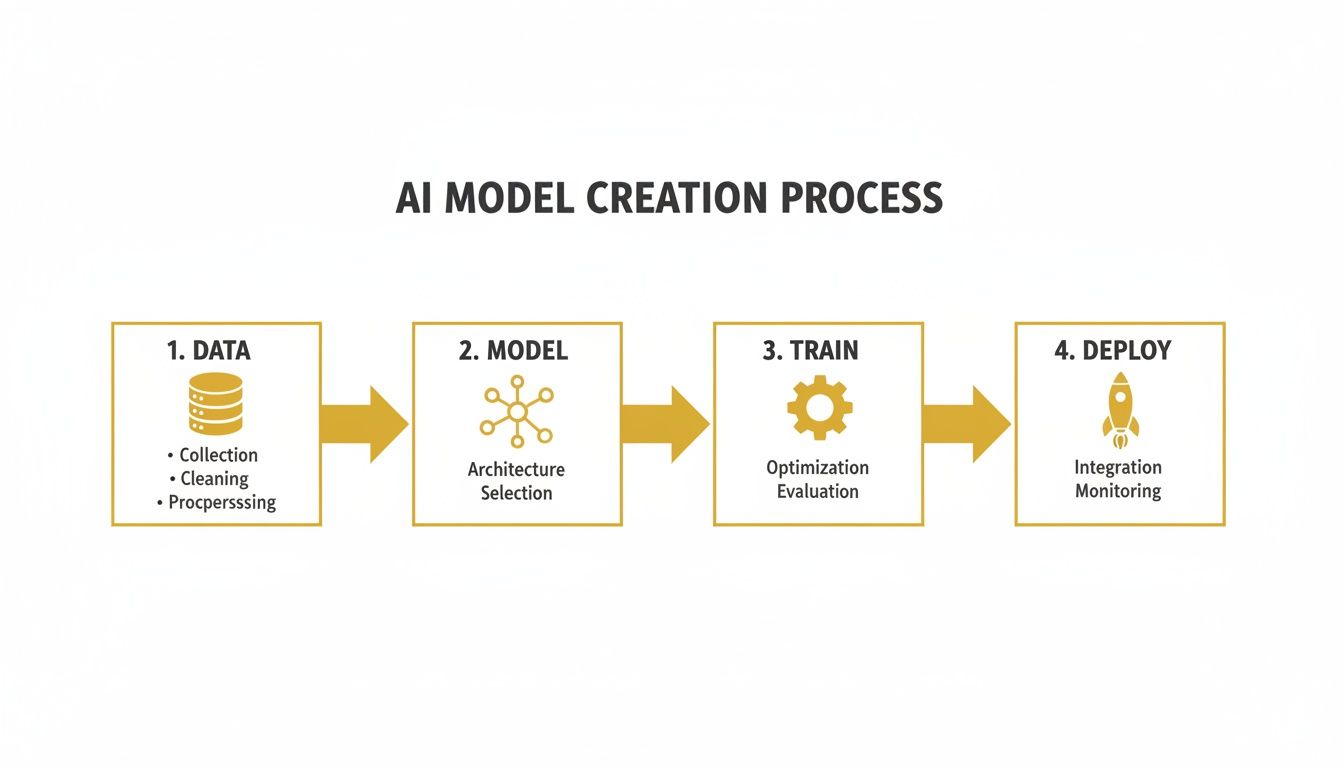
As you can see, each step flows into the next, creating a loop where the quality of your data at the beginning has a huge impact on the final model's performance. It’s a continuous cycle of improvement.
The New Economics of AI Model Creation
The biggest reason this is all possible now is the jaw-dropping drop in costs. Between late 2022 and 2024, the price tag for building high-quality image and video models completely nosedived.
The 2025 Stanford HAI AI Index highlighted this trend, reporting that the cost for inference (the process of using a trained model to make a prediction) for systems like GPT-3.5 fell by an incredible 280x between November 2022 and October 2024. On top of that, hardware costs continue to fall by about 30% every year. This massive economic shift is what makes sophisticated AI a realistic goal for smaller teams.
It’s this new reality that allows platforms like PhotoMaxi to exist, offering high-volume image and video creation at a cost that makes sense. A project that would have required a seven-figure budget and months of dedicated GPU time can now be prototyped and scaled for a tiny fraction of that investment.
Key Takeaway: The barrier to entry for creating custom AI models has been dramatically lowered. Success is no longer just about having massive resources; it's about having the right data and a smart strategy.
For a closer look at how these advancements are being used in the real world, check out our guide on the role of AI for photography, which dives into how these models are reshaping creative workflows.
The table below breaks down the key stages in building an AI model, giving you a clear summary of what's involved at each step.
| Stage | Objective | Key Activities |
|---|---|---|
| Data Collection & Preparation | Assemble a high-quality, relevant dataset that the model can learn from. | Sourcing images/videos, cleaning and filtering data, labeling, and preprocessing. |
| Model Selection & Architecture | Choose the right AI framework and approach for your specific use case. | Fine-tuning existing models, using diffusion or GANs, creating custom architectures. |
| Training & Iteration | "Teach" the model by feeding it the prepared data and refining its performance. | Running training jobs, adjusting hyperparameters, evaluating results, and repeating. |
| Deployment & Monetization | Make the trained model available as a usable tool, API, or service. | Hosting the model, creating a user interface, setting up billing, and monitoring usage. |
Ultimately, whether you decide to build a model from the ground up or opt for a turnkey solution, understanding these core principles is what will set you up for success. Throughout this guide, we'll cover:
- Data Assembly: How to find and prepare the high-quality images or videos your model needs to learn effectively.
- Architecture Selection: How to choose the right foundation for your project, whether it's fine-tuning or another method.
- Training and Iteration: The hands-on process of teaching your model and fine-tuning its output until it's just right.
- Deployment and Monetization: The final step of turning your trained model into a functional tool or a profitable service.
Assembling a High-Quality Visual Dataset
Let's get one thing straight: the most powerful AI algorithm is worthless without the right data. Think of your dataset as the curriculum you'd give a student. If the textbooks are garbage, the student isn't going to learn much. The exact same principle applies when building an AI model—the quality of your visual data directly dictates the quality of your results.
This all starts with getting your hands on the raw materials. How you go about this can look very different depending on your goals, budget, and how unique your project is. You could grab a public dataset off the shelf, but proprietary data is where you'll find the real competitive edge.

Finding Your Visual Data
First things first, you need to decide where your images or video clips are coming from. There are a few well-trodden paths, and each has its own set of trade-offs.
- Public Datasets: Massive collections like LAION-5B or COCO can be a fantastic starting point for general-purpose models. The downside? They offer sheer volume but often require a ton of cleanup to get rid of irrelevant or just plain bad content.
- Web Scraping: If you have a more specific need, scraping images from the web might seem appealing. It gives you more control, sure, but it's a minefield of legal and ethical issues around copyright. Tread carefully here.
- Proprietary Collection: This is the gold standard, hands down. Shooting your own photos or videos means you have full commercial rights and total control over quality and consistency.
For e-commerce brands, creating a proprietary dataset is almost always the right move. If you're going this route, check out our guide on how to take better product photos for some practical tips that will pay dividends in your data quality.
Expert Tip: Don't get caught up in the numbers game. A smaller, meticulously curated set of 50-100 high-quality images will consistently outperform a sloppy dataset of thousands of noisy, inconsistent pictures. Quality over quantity, always.
Data Cleaning and Preprocessing
Once you've got your raw images, the real work begins. This preprocessing stage is non-negotiable and, honestly, it’s the most important step for getting reliable results from your model. Your mission is to create a clean, standardized, and robust set of examples for the AI to learn from.
The first pass is all about cleaning house. You need to be ruthless. Go through your collection and toss out any problematic images. This means duplicates, blurry shots, poorly lit photos, or anything that doesn't fit the aesthetic you're aiming for. For instance, if you're training a model on a person's likeness, you'd ditch any photos where their face is covered or taken from a bizarre, unflattering angle.
Next up is standardization. AI models are creatures of habit; they love consistency. This means you should:
- Standardize Resolution: Resize every image to the same dimensions, like 512x512 or 1024x1024 pixels. This stops the model from getting thrown off by different image sizes.
- Normalize Colors: Tweak the color profiles and lighting so they are as consistent as possible across the entire dataset. This helps the model focus on the subject's core features, not just the temporary lighting of a single photo.
Finally, think about data augmentation. This is a clever trick to expand your dataset without shooting more photos. You create slightly modified versions of your existing images—flipping them horizontally, rotating them a few degrees, or adjusting the brightness. This simple step makes your model more robust and prevents it from just "memorizing" the training images, teaching it to recognize your subject from new perspectives and produce more creative results.
Choosing the Right AI Model Architecture
Once your dataset is clean and ready, you've hit a critical decision point. The AI model architecture you choose is the blueprint for your entire project. It dictates what your model can do, how well it does it, and what it'll cost in time and resources to get there. This isn't just a technical choice; it's a strategic one.
The good news? You almost never have to build from scratch. The vast majority of projects today revolve around fine-tuning an existing foundation model. Think of a powerful, open-source model like Stable Diffusion as a highly trained artist who already has a mastery of light, shadow, and form. Your job is to give that artist a specialized education with your dataset—teaching it a specific face, a new product line, or a unique artistic style.
This approach is incredibly efficient and has dramatically lowered the barrier to entry. It's the go-to method for creating a consistent digital person or training a model to render your products with perfect brand accuracy.
A Look at the Most Popular Architectures
While fine-tuning is the most common path, different architectures are built for different visual tasks. Knowing their strengths helps you pick the right tool for your creative vision.
Here's a quick breakdown of the main players in the visual AI space and where they shine. Understanding these differences is key to matching the technology to your specific project goals.
Comparing AI Model Architectures for Visuals
| Architecture Type | Best For | Key Advantage | Considerations |
|---|---|---|---|
| Fine-Tuning | Adapting a general model for a specific style, object, or person. | Fast, resource-efficient, and great for general-purpose customization. | Can sometimes "forget" its original training if over-trained on a small dataset. |
| Diffusion Models | Generating highly detailed, photorealistic images from text prompts. | State-of-the-art image quality and a high degree of creative control. | Computationally intensive during training and inference. |
| GANs | Creating novel, artistic, or surreal visuals; data augmentation. | Can produce highly unique and unexpected results. | Can be unstable to train and harder to control than diffusion models. |
| Embedding (LoRA/TI) | Recreating a specific person's likeness or a very niche style consistently. | Small, portable files that capture a concept with incredible precision. | Requires careful data preparation for the subject you want to capture. |
Each of these approaches has its place. The best choice always comes back to what you're trying to achieve—whether it's photorealism, artistic expression, or perfect consistency.
Making the Right Call for Your Project
So, how do you decide? Let's walk through a couple of real-world scenarios.
If you're an e-commerce brand that needs to generate thousands of product shots on different backgrounds, fine-tuning a diffusion model on your product catalog is a perfect fit. It’s fast, effective, and gets the job done.
But if you're a creator building a virtual influencer, your top priority is likeness. You can't have their face changing from one image to the next. In this case, you'd likely use an embedding method like LoRA to lock in their facial features, ensuring that influencer looks identical in every single post. For a closer look at the software powering these workflows, check out our guide to the best AI tools for content creation.
This explosion in AI adoption means the platforms you build on have to be solid. Research from the St. Louis Fed projects that business adoption of generative AI will jump from 44.6% to 54.6% in just one year. Developers are on board, too, with a recent Stack Overflow survey finding that 84% are already using or plan to use AI tools.
Choosing an architecture is always a game of trade-offs. Fine-tuning gets you speed and efficiency. Specialized techniques like embeddings give you pinpoint control. Your end goal should always be the deciding factor.
This is where a platform like PhotoMaxi comes in. It handles all this complexity behind the scenes. You don't have to worry about whether to use a diffusion model or an embedding. The platform automatically picks the best architecture for your task, whether that’s creating a synthetic model from a single photo or generating a new product scene. It’s a turnkey solution that delivers the power of these advanced models without the steep technical learning curve.
Mastering the Training and Iteration Loop
Alright, you've got your carefully curated dataset and you've picked your architecture. Now comes the fun part: the training loop. This is where your model goes from being a generic framework to a highly specialized tool that actually understands the nuances of your data.
Think of it less like a computer process and more like an intensive apprenticeship. You're repeatedly showing the model your data in small batches, and with each pass, it adjusts its internal wiring to get better at creating the kind of images you want. This isn't a "set it and forget it" situation, though. You have to keep a close eye on the process to make sure it's actually learning the right lessons.

Fine-Tuning Your Training Parameters
Before you hit "go," you need to dial in a few key settings called hyperparameters. These don't control what the model learns, but how it learns. Getting these right can mean the difference between a brilliant model and a digital paperweight.
The two most important dials you'll be turning are the learning rate and the number of training steps.
- Learning Rate: This setting dictates how big of an adjustment the model makes after seeing each batch of data. A high learning rate is like taking huge, confident strides—you might get to a good result faster, but you could just as easily leap right past it. A low learning rate is more like taking small, deliberate steps. It's slower, but you're much less likely to miss your mark.
- Training Steps: This is simply how long you let the model cook. Not enough steps, and it remains half-baked and won't know what it's doing. But let it go for too long, and you run headfirst into a nasty problem called overfitting.
Overfitting is what happens when your model stops learning the general patterns in your data and starts memorizing the training examples themselves. It becomes a perfect mimic of your dataset but completely loses the ability to create anything new or different. It’s like a musician who can perfectly replicate one song but can't improvise or play anything else.
My Two Cents: Always start with a lower learning rate and a conservative number of steps. It's way easier to resume training on a model that needs a little more time in the oven than it is to salvage one that's been "fried" by overfitting.
The Crucial Cycle of Evaluation and Iteration
Let's be real: your first training run is almost never going to be the one. The real progress comes from the loop of testing your model, seeing where it fails, and making smart adjustments. This cycle is what separates hobbyist models from professional, high-performing ones.
Once a training run is finished, it's time to put the model through its paces. Generate a bunch of images with a wide range of prompts to see how it holds up. For a model trained on a person's likeness, for instance, you'd want to test different angles, a variety of expressions, and various lighting setups.
Here’s a practical checklist for your evaluation:
- Likeness Consistency: Does the person or object look right in every single image? Be picky. Look for tiny shifts in facial structure, eye color, or other key features that give it away.
- Style Adherence: If you trained on a specific art style, is it nailing that style every time? Or does it sometimes get lazy and default to a generic "AI" look?
- Prompt Following: How well does it take direction? If your prompt is "a person smiling on a beach at sunset," you should get all three of those elements. If the beach is missing, that's a problem.
- Artifacts and Glitches: Be on the lookout for visual weirdness. Distorted hands, funky textures, and nonsensical backgrounds are classic signs that a model is either undertrained or starting to overfit.
Based on your findings, you plan your next move. If the likeness feels a bit off, maybe you need to circle back and add more variety to your dataset. If you're seeing a lot of digital artifacts, you might try tweaking the learning rate and running the training again.
This constant loop of train-evaluate-refine is where the magic really happens. With each cycle, you're getting closer to a polished, reliable model that does exactly what you need it to do.
Deploying and Monetizing Your AI Model
An AI model sitting on a hard drive is just a fascinating experiment. Its true value is only unlocked when real people can actually use it. This is the deployment stage—the moment your trained model graduates from a research project into a functional tool that can make a real-world impact and, yes, generate revenue.
At its core, deployment means taking your trained model files, putting them on a server, and setting them up to handle requests. A user asks for something, the server runs your model to generate an image or video (a process called inference), and sends the result back. How you build this can be anything from a DIY server setup to a fully managed service.

From Model to Live Service
The first big decision is figuring out how people will access your model. Will it be the engine behind a web app? A mobile app? Or will it be an API that other developers can plug into their own products?
- Cloud-Based Inference Server: For those who want total control, setting up your own server on AWS, Google Cloud, or Azure is the way to go. This means you're responsible for everything: configuring a virtual machine with the right GPUs, building an API endpoint, and managing security and uptime. It’s incredibly flexible, but it demands serious technical skill.
- Managed AI Platforms: On the other hand, services like Replicate or Hugging Face Spaces handle the heavy lifting for you. You just upload your model, and they provide the infrastructure and a ready-to-use API. It's a great middle ground that removes the operational headaches.
No matter which path you choose, the end goal is a stable system that doesn't crash under user traffic. And for visual models, speed is everything—nobody is going to wait several minutes for one image to generate.
Crafting Your Monetization Strategy
Once your model is live, you need a plan to make it generate value. The market for AI-powered creative tools is exploding, and there are huge opportunities for creators and businesses that know how to package their tech.
The numbers back this up. Enterprise spending on generative AI is projected to hit $37 billion in 2025, a massive leap from $11.5 billion in 2024. What’s really interesting is that almost half of that spend—nearly $19 billion—is going toward user-facing applications built on top of foundation models. This shows a huge appetite for services that turn AI capabilities into real-world results, as detailed in this 2025 enterprise AI report.
Here are a few proven ways to monetize a visual AI model:
| Monetization Model | Description | Best For |
|---|---|---|
| Pay-Per-Image | Users buy credits and spend them to generate a set number of images. | Casual users or one-off projects where a subscription feels like too much commitment. |
| Subscription Tiers | Monthly or annual plans offer a certain number of credits, faster generation, and premium features. | Regular users, content creators, and businesses who need a consistent flow of images. |
| API Access | Other businesses pay you to integrate your model's unique style into their own apps. | Developers and platforms that want to offer your unique visual outputs as a feature. |
Key Insight: Don't just sell "image generation." Sell the solution. Frame your service around what it accomplishes, like "unlimited product photos for your Shopify store" or "on-brand social media content in minutes."
This is exactly where a platform like PhotoMaxi comes in, simplifying the entire journey from model to market. It handles the complex backend challenges of deployment and monetization for you. Instead of battling with cloud servers and payment systems, you get a turnkey solution that bundles everything—compute power, storage, and commercial usage rights—into simple, scalable plans.
For creators and merchants, it’s the perfect way to get reliable, high-quality output without having to manage any of the underlying tech.
5. Navigating the Ethical and Legal Landscape
Creating AI models, especially those built on images of people, isn't just a technical challenge—it's a walk through a complex ethical and legal minefield. The guiding principle here is simple, but crucial: with incredible creative power comes serious responsibility. Before you even download your first image, you have to nail down consent, privacy, and ownership. Getting this wrong can land you in a world of legal trouble.
The absolute foundation of any ethical AI project is the data. If you’re training a model on someone’s face or body, you must have their explicit, informed consent. I’m not talking about a quick DM or a verbal okay. You need a rock-solid, written contract spelling out exactly how their likeness will be used, for how long, and for what specific commercial purposes.
Securing Rights and Understanding Ownership
Just because a photo is online doesn't mean it's free to use. Far from it. Most images are copyrighted, and using them without a license is a straight-up infringement. When you're dealing with a person's image, you also bump into "right of publicity" laws. These laws give individuals control over the commercial use of their name, image, and identity.
A huge mistake I see people make is assuming that because they trained the model, they own everything it produces. The legal world is still catching up to AI, but here are the key things you need to have straight:
- Data Rights: Do you have explicit, commercial licenses for every single image in your training set? For models based on a specific person, this means getting a signed model release. No exceptions.
- Model Ownership: You own the trained model file itself (the weights and architecture), but that doesn’t automatically give you a free pass on the concepts it learned, especially if the source data was scraped without permission.
- Output Copyright: This one trips a lot of people up. In many places, like the United States, content generated purely by AI without significant human creative input can't be copyrighted. Think about what that means for your ability to protect and monetize your work.
The Bottom Line: Your ability to legally use and sell an AI model's output is only as strong as the rights you secured for your training data. Cutting corners here is a recipe for disaster.
A Pre-Launch Legal Checklist
Before you start building, run through these questions. Your future self will thank you.
- Consent: Do I have explicit, written permission from every identifiable person in my dataset for the exact commercial use I have planned?
- Copyright: Do I hold a clear commercial license for every copyrighted image or video I intend to use for training?
- Disclosure: Will I be transparent that the generated content is made by AI, especially when it involves realistic human likenesses? This is becoming a big deal.
- Jurisdiction: Am I aware of the specific likeness and privacy laws in the regions where my model or its content will be sold or used? What’s legal in one country might not be in another.
This is exactly where a platform like PhotoMaxi can be a lifesaver. It provides a more controlled environment where the commercial usage rights are clearly defined within their plans, helping you sidestep these legal headaches from the get-go.
Got Questions About Making Your Own AI Model?
Jumping into AI model creation for the first time usually sparks a ton of questions. Let's tackle some of the most common ones I hear from creators and merchants so you can get started with a bit more clarity.
How Much Data Do I Really Need?
This is the big one, and the answer is almost always "less than you think, but it has to be good." If you're training a model on a person's likeness, a well-chosen set of 20-50 high-quality images is often plenty. The key is to capture different angles, expressions, and lighting.
For a product or an object, you'll want to aim a little higher—think 50-100 images. This gives the model enough information to learn all the important details from every possible view.
The golden rule here is simple: quality over quantity. A small, clean, and consistent dataset will always beat a huge pile of messy, irrelevant, or blurry images. Garbage in, garbage out. It’s the truest cliché in AI.
How Long Does Training Actually Take?
This is a classic "it depends" scenario. The time it takes to train a model can swing dramatically based on a few things:
- Your Dataset's Size: More images and more complexity mean more processing time.
- The Model's Architecture: Fine-tuning a pre-existing model is way faster than building one from the ground up.
- The Hardware You're Using: This is a game-changer. Training on a top-tier NVIDIA H100 GPU is worlds apart from using an older, consumer-grade card. It can shrink training time from days to hours.
For a standard fine-tuning job with a small, curated dataset of around 50 images, the actual training might take anywhere from 30 minutes to a couple of hours. But don't forget to factor in the time for gathering and cleaning up your data—that's where a lot of the real work happens.
What Are the Biggest Mistakes People Make?
A few common traps catch newcomers off guard. The absolute biggest one is overfitting. This is what happens when you train the model for too long on a small dataset. It essentially memorizes your training images instead of learning the actual subject. You end up with a model that just spits back what it's already seen and has zero creative ability.
Another pitfall is just plain bad data prep. If you don't take the time to weed out blurry photos, remove duplicates, or fix inconsistent lighting, your model's performance will suffer. You simply can't skip the prep work and expect great results.
Ready to sidestep the headaches of dataset collection, training, and deployment altogether? With PhotoMaxi, you can create a synthetic, monetizable version of yourself or your products starting from just one image. Generate studio-quality visuals in any style, setting, or pose you can imagine—in minutes, not weeks. Get started with PhotoMaxi today.
Related Articles


Ready to Create Amazing AI Photos?
Join thousands of creators using PhotoMaxi to generate stunning AI-powered images and videos.
Get Started Free