
10 Pro Headshot Lighting Setups to Master in 2026
A great headshot is a powerful professional asset, but the secret behind a truly compelling portrait lies in the lighting. The right illumination can sculpt features, convey a specific mood, and transform a simple photo into a polished, impactful statement. While professional lighting can seem like a technical hurdle reserved for studio photographers with expensive gear, it’s a skill that can be broken down into clear, repeatable formulas. This guide demystifies the process entirely.
We will explore 10 essential headshot lighting setups, ranging from timeless Hollywood classics to clean, modern corporate styles. Each entry is a complete blueprint, providing actionable steps, visual diagrams, and expert tips to help you master the technique. You'll learn the precise setups used to create iconic looks like Rembrandt, Butterfly, and Split lighting, and understand when to apply each one for maximum effect, whether for creative, corporate, or beauty portraits.
More importantly, this guide bridges the gap between traditional photography and modern technology. For every classic setup, we will also demonstrate how you can instantly achieve these professional results using AI tools like PhotoMaxi. This puts the power of a complete studio at your fingertips, no physical equipment necessary. Whether you're a photographer refining your craft, a content creator building a brand, or a professional seeking the perfect avatar, this is your definitive resource for creating flawless headshots that capture attention and open doors. Let's dive into the setups that will elevate your portraits from good to unforgettable.
1. Three-Point Lighting
Three-point lighting is the undisputed cornerstone of professional portraiture and one of the most fundamental headshot lighting setups an artist can master. This classic arrangement provides controlled, dimensional, and flattering illumination, making it the go-to standard for corporate, acting, and commercial headshots. It meticulously sculpts the subject's features by using three distinct light sources, each with a specific purpose.
The setup consists of a key light, a fill light, and a back light. The key light is the primary source, establishing the overall exposure and creating the main shadows. The fill light is a secondary, less powerful source positioned opposite the key, designed to soften those shadows without eliminating them entirely. Finally, the back light (or rim/hair light) is placed behind the subject to create a subtle glow around their hair and shoulders, cleanly separating them from the background.
Why It Works So Well
This technique provides maximum control over depth and dimension. By carefully balancing the ratios between the three lights, you can create looks ranging from high-key and optimistic to low-key and dramatic. It’s a versatile foundation that ensures a polished, professional result every time, eliminating flat, uninspired lighting.
How to Implement Three-Point Lighting
- Key Light: Position your main light (often a softbox or octabox) at a 45-degree angle to the subject and slightly above eye level. This creates a pleasing shadow pattern, like Rembrandt or loop lighting.
- Fill Light: Place a reflector or a second, less intense light on the opposite side of the subject. Its job is to "fill in" the shadows cast by the key light. A common power ratio is setting the fill to half the power of the key light.
- Back Light: Position this light behind and above the subject, aimed at the back of their head and shoulders. Be careful to avoid lens flare by keeping the light out of your camera's direct line of sight.
Pro Tip: Use a light meter to precisely measure the output of each light and achieve a consistent lighting ratio, such as 3:1 (key to fill). This ensures predictable, professional results across an entire session.
Recreating with PhotoMaxi
When using AI to generate or enhance headshots, referencing a three-point lighting setup is crucial. In PhotoMaxi, you can use prompts like "professional headshot, three-point studio lighting, soft key light from the right" to guide the AI in creating a polished, dimensional portrait. This ensures the relighting engine understands the need for a key, fill, and rim light, producing results that mimic a high-end studio session. For a deeper dive into studio setups, you can explore this detailed guide to the best light setup for headshots.
2. Rembrandt Lighting (45-Degree Split Lighting)
Named after the iconic Dutch painter, Rembrandt lighting is one of the most classic and dramatic headshot lighting setups available to photographers. This technique is defined by its signature visual cue: a small, inverted triangle of light on the cheek of the subject's shadow side. It creates depth, mood, and a timeless, artistic quality, making it a favorite for portraits that demand a sense of character and sophistication.
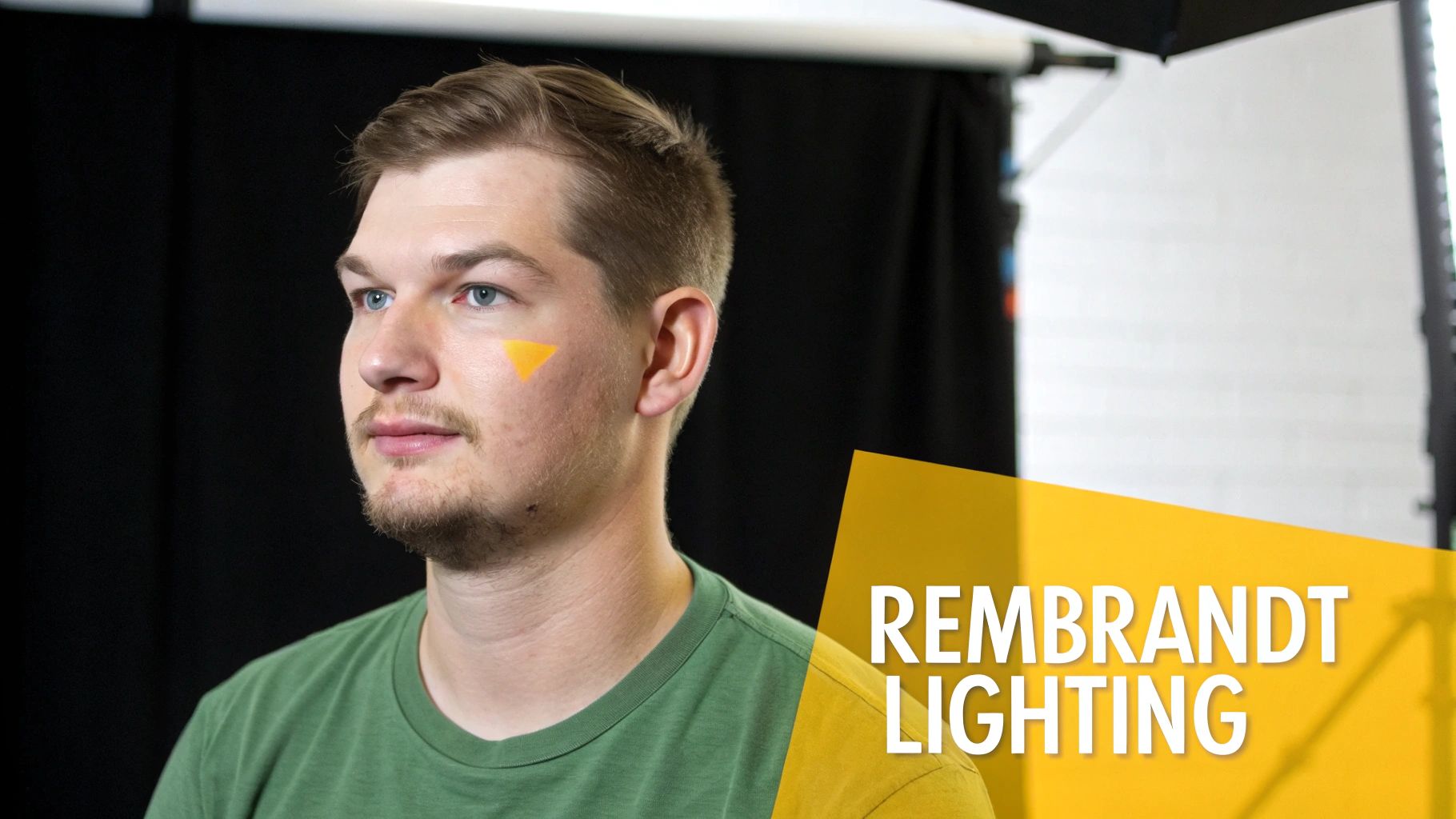
The setup typically uses a single key light and sometimes a reflector or a very low-powered fill light. The key light is positioned high and to one side of the subject, sculpting their features with a beautiful interplay of light and shadow. The resulting high-contrast look is perfect for actor headshots, fine art portraits, and any situation where you want to add a touch of cinematic drama.
Why It Works So Well
Rembrandt lighting is exceptionally effective at creating a sense of three-dimensionality and mood without complex equipment. The precise shadow placement accentuates the bone structure, particularly the cheekbones and jawline, adding a sculpted, powerful feel. Its blend of shadow and light gives the final image a profound, painterly quality that feels both classic and compelling.
How to Implement Rembrandt Lighting
- Key Light: Place your main light source at a 45-degree angle to the subject and raise it high enough to cast a shadow from their nose that connects with the shadow on their cheek.
- Create the Triangle: The key is to adjust the light's height and angle until you see that distinct triangle of light appear under the eye on the shadow side of the face.
- Manage Shadows: Use a reflector or a very dim fill light on the opposite side to gently lift the shadows if they are too dark, but be careful not to eliminate the contrast that defines this style.
Pro Tip: The size and shape of the light modifier matters. A smaller source like a beauty dish or a gridded softbox will create harder, more defined shadows, enhancing the dramatic effect, while a larger source will produce a softer transition.
Recreating with PhotoMaxi
To achieve this moody, artistic style with AI, use specific and descriptive prompts. In PhotoMaxi, try phrases like "dramatic actor headshot, single key light, Rembrandt lighting from the left, deep shadows" or "fine art portrait, 45-degree lighting creating a triangle of light on the cheek." This tells the AI to prioritize a high-contrast, directional light source, producing a professional studio portrait with a classic, painterly feel.
3. Butterfly (Paramount) Lighting
Named for the symmetrical, butterfly-shaped shadow it creates beneath the nose, Butterfly lighting is one of the most classic and glamorous headshot lighting setups. Popularized during the golden age of Hollywood by studios like Paramount, this technique delivers clean, flattering, and sophisticated illumination. It’s a favorite for beauty, commercial, and entertainment headshots because it accentuates cheekbones and creates a bright, even look.
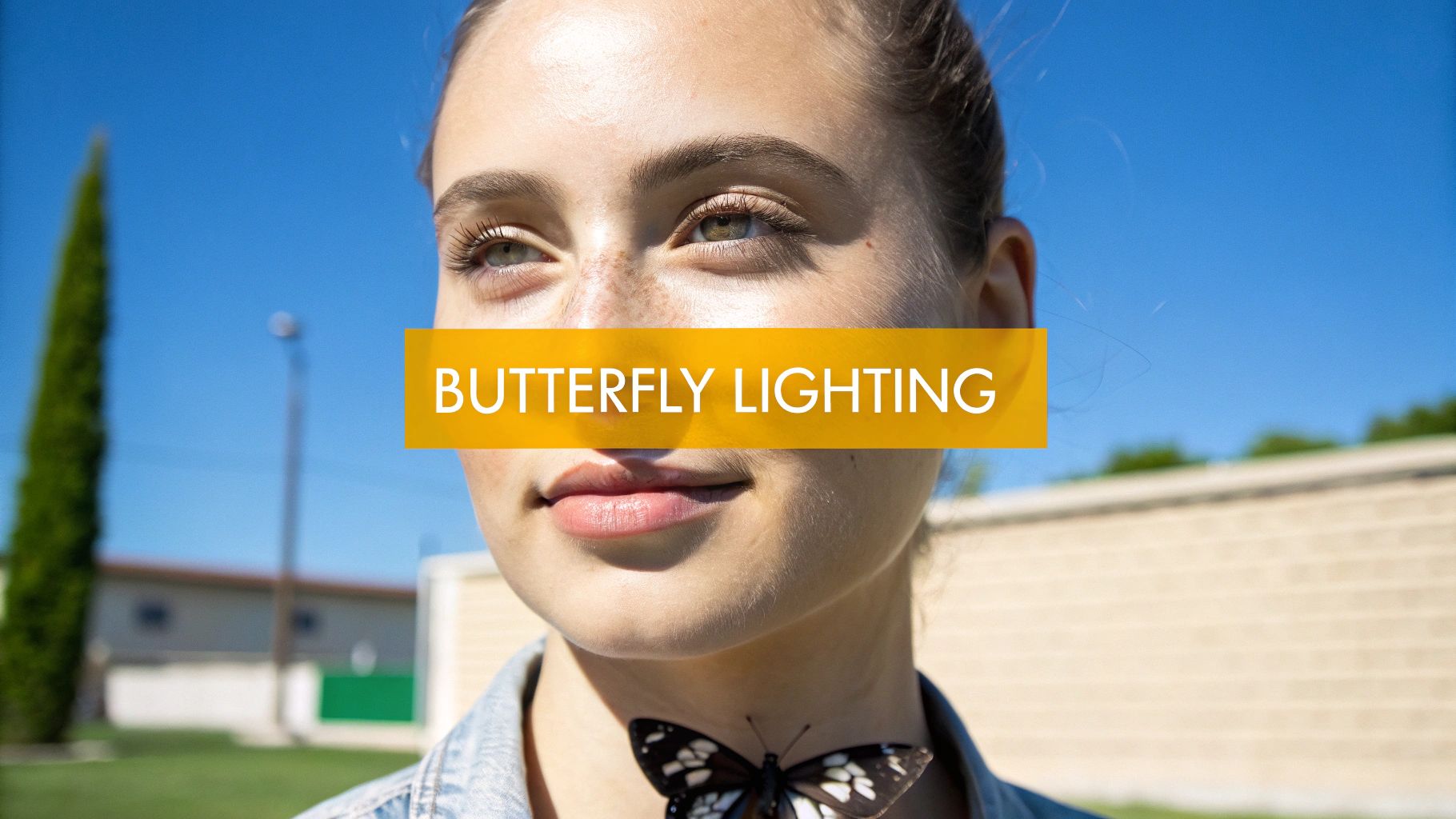
The setup involves a single key light positioned directly in front of and above the subject's eye line. This centered placement produces balanced, symmetrical light that minimizes skin imperfections and defines the jawline and cheekbones. The result is a timeless, high-end portrait that exudes confidence and poise.
Why It Works So Well
Butterfly lighting is universally flattering because its direct, downward angle carves out facial features beautifully. It creates pleasing highlights on the forehead, bridge of the nose, and chin while casting shadows that add depth and dimension. This makes it an ideal choice for beauty photography, where flawless skin and sculpted features are paramount. It’s also incredibly simple, often requiring just one key light and a reflector.
How to Implement Butterfly Lighting
- Key Light: Place your main light source (a beauty dish is a classic choice) directly in front of your subject, centered with their face. Raise it above eye level until you see the characteristic butterfly shadow form just beneath their nose.
- Fill Light (Optional): To soften the shadows under the chin and nose, place a reflector directly below the subject's chest, angled up toward their face. This will bounce light back into the shadows for a brighter, cleaner look.
- Watch the Angle: Be careful not to place the key light too high, as this will elongate the nose shadow and create deep, unflattering shadows in the eye sockets.
Pro Tip: For a classic Hollywood glamour effect, pair Butterfly lighting with a hair light. Position a second, gridded light behind the subject to add a subtle sheen to their hair, separating them from the background and adding a touch of drama.
Recreating with PhotoMaxi
Simulating this elegant setup with AI is straightforward. In PhotoMaxi, use prompts that specify the technique, such as "beauty headshot, butterfly lighting setup, centered key light, soft shadows" or "classic Hollywood portrait, Paramount lighting style." This instructs the AI to generate an image with a high, central light source, ensuring the final render has the defined cheekbones and flattering shadows that make this setup so iconic.
4. Loop Lighting
Loop lighting is a universally flattering technique and one of the most widely used headshot lighting setups in professional portraiture. It strikes a perfect balance between creating dimension and maintaining a soft, appealing look. This setup is a subtle variation of broader lighting patterns, defined by the small, loop-shaped shadow it casts from the subject's nose onto their cheek.
The defining characteristic of this setup is the position of the key light. By placing it slightly higher than the subject's eye level and about 30-45 degrees off-axis from the camera, it creates a shadow that is both directional and soft. This adds just enough depth to define the facial structure without the dramatic intensity of Rembrandt lighting, making it an ideal choice for corporate and professional portraits.
Why It Works So Well
This technique is a go-to for professionals because it is flattering for almost every face shape. The small loop shadow subtly contours the cheekbones and adds a sense of three-dimensionality without being overly dramatic. It’s an efficient, reliable setup that consistently produces a polished, approachable, and competent look, making it a staple for business and actor headshots.
How to Implement Loop Lighting
- Key Light: Place your main light source (a softbox is ideal) about 30 to 45 degrees to one side of the camera and position it slightly above the subject's eye level.
- Monitor the Shadow: Adjust the light's height and angle until you see a small, downward-pointing shadow "looping" from the base of the nose. Crucially, this shadow should not touch the shadow on the corner of the mouth.
- Add Fill: Use a reflector or a secondary fill light on the opposite side of the key light to gently lift the shadows on the darker side of the face. Keep the fill power low to maintain dimension.
Pro Tip: The size and direction of the loop shadow are your main guides. A small, well-defined loop is perfect. If the shadow becomes too long or touches the corner of the mouth, your light is likely too high or too far to the side.
Recreating with PhotoMaxi
To achieve this classic look with AI, specific prompting is key. In PhotoMaxi, use a prompt like "corporate headshot of a woman, loop lighting from camera left, soft shadows, studio background." This command directs the AI to render the characteristic nose shadow and balanced contrast that defines this popular lighting style. For more inspiration on professional looks, check out this guide on achieving the perfect LinkedIn headshot.
5. Split Lighting
Split lighting is a bold and dramatic technique among the various headshot lighting setups, prized for its ability to create high-contrast, moody, and powerful portraits. This setup is defined by its core principle: placing a single key light directly at a 90-degree angle to the subject. The result is a striking division where one side of the face is brightly illuminated while the other falls completely into shadow, creating a distinct line down the center of the face.
This technique is less about flattering illumination and more about crafting a specific mood or revealing character. The stark contrast between light and dark creates a sense of mystery, strength, or intensity, making it a favorite for artistic portraits, editorial shoots, and character-driven headshots for actors or musicians. It’s a powerful tool for visual storytelling that commands the viewer’s attention.
Why It Works So Well
Split lighting excels at creating visual tension and a strong graphic quality. By simplifying the face into two distinct halves, it emphasizes facial structure, texture, and contours in a way that softer lighting cannot. This makes it ideal for portraits that need to convey confidence, drama, or a complex personality. Its high-impact aesthetic is perfect for making a bold statement in a portfolio or promotional material.
How to Implement Split Lighting
- Key Light: Position your main light source (a gridded softbox or beauty dish works well to control spill) at a perfect 90-degree angle to one side of your subject. The light should be level with or slightly above their eye line.
- Minimal Fill: The goal is drama, so avoid using a strong fill light. If the shadow side is too dark, you can introduce a black V-flat or negative fill to deepen the shadows or a white reflector placed far away to barely lift the detail.
- Refine the Split: Ask the subject to turn their head slightly toward or away from the light until you see a clean, perfect split down the middle of their nose and lips.
- Edge Separation: To prevent the subject from blending into a dark background, consider adding a very subtle back or rim light on the shadow side to gently outline their silhouette.
Pro Tip: The success of split lighting often depends on the subject's facial structure. It tends to be more effective on individuals with strong, angular features like a defined jawline or prominent cheekbones.
Recreating with PhotoMaxi
To generate a headshot with this dramatic look, your AI prompt needs to be specific. In PhotoMaxi, use prompts like "dramatic headshot, split lighting from the left, deep shadows, dark background" or "artistic portrait with 90-degree key light, high contrast." Specifying the light’s position and the desired contrast level will guide PhotoMaxi’s relighting engine to create the signature stark division that defines this powerful lighting style.
6. Short Lighting
Short lighting is a classic and highly flattering portrait technique that prioritizes drama and facial sculpting. It is one of the most effective headshot lighting setups for creating a slimming effect on the subject's face. The core principle involves illuminating the side of the face that is turned away from the camera, leaving the side closer to the lens in more shadow.
This setup is achieved by positioning the key light so that the broader side of the face (closer to the camera) is less illuminated, while the "shorter" side (further from the camera) receives the main light. This strategic placement adds significant depth, contour, and a sense of three-dimensionality, making it a favorite for beauty, fashion, and dramatic portraiture. It naturally narrows the appearance of the face.
Why It Works So Well
Short lighting is a powerful tool for visual storytelling and flattering your subject. By casting the larger, nearer portion of the face in shadow, it creates an immediate slimming effect, which is often desirable in professional headshots. This technique is brilliant for adding mystery and depth, guiding the viewer's eye to the illuminated features while accentuating cheekbones and jawlines.
How to Implement Short Lighting
- Key Light: Ask your subject to turn their head slightly away from the main light source. Position your key light to illuminate the far side of their face, creating a distinct shadow line down the center.
- Camera Position: Place your camera on the shadow side of the face. Your lens should be looking at the less-lit side of your subject, capturing the interplay between light and shadow.
- Fill Light: Use a reflector or a secondary light source at a low power setting to gently lift the shadows on the near side of the face. The goal is to retain detail without losing the slimming, dramatic effect.
- Control the Shadows: The distance and angle of your key light will determine the hardness and placement of the shadows. Move it closer for softer shadows and further for harder, more defined lines.
Pro Tip: Combine short lighting with Rembrandt or loop lighting patterns by adjusting your key light’s height and angle. This creates a small triangle of light on the shadowed cheek, adding even more professional polish.
Recreating with PhotoMaxi
To achieve this sophisticated look with AI, you can guide the model with specific instructions. In PhotoMaxi, use prompts like "professional headshot, dramatic short lighting from the left, deep shadows on the right side of the face" or "beauty portrait using a short lighting setup to slim the face." This tells the AI to place the main light on the far side of the subject, creating that classic, contoured appearance perfect for high-end portraits.
7. Broad Lighting
Broad lighting is a classic portrait lighting style where the side of the subject’s face turned toward the camera is most brightly lit. This technique is one of the foundational headshot lighting setups used to create an open and welcoming feel. By illuminating the largest visible area of the face, it produces a broadening effect, making it an excellent choice for subjects with narrower facial structures.
The setup involves placing the key light so it illuminates the side of the face closest to the camera, with the subject’s head turned slightly away. The result is a well-lit, approachable portrait where the shadows fall on the far, smaller side of the face. This approach is highly effective in commercial, corporate, and social media contexts where a friendly and direct look is desired.
Why It Works So Well
This technique is effective because it creates a sense of openness and accessibility. The bright, direct illumination minimizes dramatic shadows on the broad side of the face, resulting in a clean, high-key appearance that feels warm and trustworthy. Its ability to subtly widen the face makes it a go-to corrective technique for photographers working with subjects who have slender or oval-shaped faces.
How to Implement Broad Lighting
- Subject Position: Have your subject turn their head slightly away from the camera, about 30 degrees.
- Key Light: Place your main light source on the side of the face that is turned towards the camera. This ensures the broadest part of their face receives the most light.
- Fill Light: Use a reflector or a secondary light on the opposite side to gently fill in the shadows on the "short" side of the face. This maintains detail without creating a flat look.
- Camera Angle: Position your camera so you are shooting towards the illuminated side of the subject's face.
Pro Tip: Be mindful of the subject's face shape. While perfect for narrow faces, broad lighting can make round or wide faces appear even fuller. Always assess your subject first to decide if this style is the most flattering choice.
Recreating with PhotoMaxi
To achieve this look with AI, your prompt should specify both the lighting style and its intended effect. In PhotoMaxi, try a prompt like: "Corporate headshot of a friendly professional, broad lighting setup with the key light on the near side of the face." You can also add modifiers like "soft, welcoming light" to guide the AI in generating a portrait that feels open and approachable, perfect for a LinkedIn profile or company website.
8. Glamour Lighting (High-Key Lighting)
Glamour lighting, often referred to as high-key lighting, is one of the most flattering and idealized headshot lighting setups used in beauty, fashion, and commercial photography. This technique is designed to minimize shadows, smooth skin texture, and create a bright, ethereal glow. It produces a polished, aspirational look by deliberately reducing contrast and embracing a clean, luminous aesthetic.
The setup works by enveloping the subject in soft, diffused light from multiple angles. It typically involves a large key light and an equally powerful fill light to eliminate harsh shadows on the face. Additional lights, like hair lights and background lights, are often used to ensure the subject pops from the bright, often pure white, background, preventing a flat, washed-out appearance.
Why It Works So Well
This technique is exceptionally flattering because the abundance of soft light minimizes the appearance of wrinkles, blemishes, and skin imperfections. The low-contrast, high-key environment creates a feeling of optimism, luxury, and cleanliness, making it perfect for beauty brands, celebrity portraits, and high-end advertising where a flawless presentation is paramount. It communicates a message of perfection and elegance.
How to Implement Glamour Lighting
- Key & Fill Lights: Position two large, soft light sources (like 36-inch or 48-inch softboxes or octaboxes) on either side of the camera, both aimed at the subject at roughly 45-degree angles. Keep their power levels similar to minimize shadows.
- Background Lights: Use one or two additional lights aimed at your white or light-toned background. The goal is to overexpose the background, making it pure white and ensuring clean separation.
- Exposure: Set your camera to slightly overexpose the subject's skin tones without clipping the highlights. This contributes to the signature bright and airy feel. A hair light can be added to define the subject's silhouette.
Pro Tip: Use a large v-flat or white reflector placed just below the subject's chest and out of the frame. This will bounce light back up into their face, filling in any shadows under the chin and eyes for an even cleaner look.
Recreating with PhotoMaxi
To achieve a glamour look with AI, your prompt must emphasize brightness and softness. In PhotoMaxi, use prompts like "beauty headshot, high-key glamour lighting, flawless skin, bright white background, soft diffused light." This instructs the AI to generate an image with minimal shadows, even illumination, and a clean, commercial aesthetic. For more on creating polished looks, explore this guide to achieving a professional headshot.
9. Dramatic/Chiaroscuro Lighting (Low-Key Lighting)
Dramatic or Chiaroscuro lighting is a high-contrast, artistic technique that uses deep shadows and selective illumination to evoke mood, mystery, and depth. As one of the more expressive headshot lighting setups, it moves beyond simple representation to create a powerful emotional statement. Inspired by Renaissance painting, this low-key approach carves the subject out of darkness, focusing on form and texture.
This setup typically relies on a single, controlled key light with little to no fill light. The goal is not to eliminate shadows but to embrace them as a core compositional element. By allowing significant portions of the face and background to fall into darkness, the photographer directs the viewer’s eye precisely where they want it, emphasizing features like the eyes, jawline, or a specific expression. This makes it ideal for character actors, musicians, and fine art portraits.
Why It Works So Well
Chiaroscuro lighting is powerful because it adds a layer of narrative and psychological depth. The deep shadows create a sense of intrigue and gravitan, transforming a simple headshot into a compelling character study. It's an intentional choice to reveal less, which in turn makes the illuminated features more impactful and memorable. This technique is perfect for subjects who need to convey intensity, seriousness, or a strong artistic persona.
How to Implement Dramatic/Chiaroscuro Lighting
- Key Light: Use one hard light source, like a gridded softbox or a snoot, placed to the side of the subject (Rembrandt or split lighting positions work well). This creates defined, crisp shadows.
- Minimal Fill: Avoid using a fill light. If the shadows are too harsh, use a black flag or negative fill on the opposite side to absorb ambient light and deepen them further.
- Background: Use a dark, non-reflective background like black seamless paper or velvet to ensure it absorbs light and remains dark.
- Posing: Direct your subject to turn their face into and out of the light to control exactly which features are highlighted and which are obscured in shadow.
Pro Tip: The key to successful chiaroscuro is maintaining a catchlight in the subject’s eye, even on the shadow side. This small reflection ensures the portrait feels alive and connected, preventing the eyes from looking vacant.
Recreating with PhotoMaxi
To achieve this moody, artistic style with AI, use specific and descriptive prompts in PhotoMaxi. Try phrases like "cinematic headshot, dramatic chiaroscuro lighting, single hard key light from the side, deep shadows, black background" or "low-key portrait of an actor, mysterious mood, strong directional light." This guides the AI to generate an image that prioritizes high contrast and shadow, mimicking the work of a seasoned portrait photographer.
10. Window/Natural Light Simulation Lighting
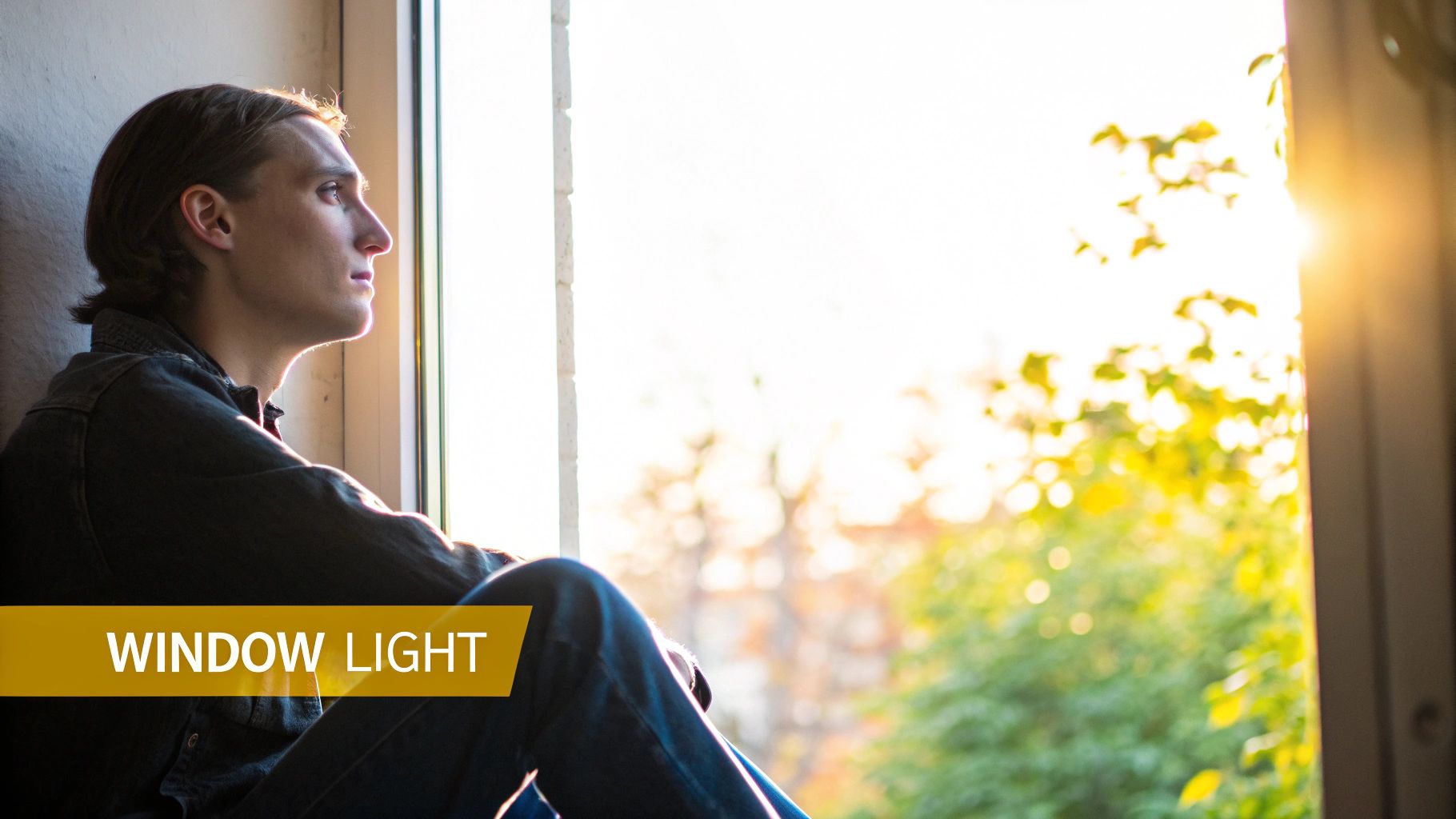
Mimicking the soft, directional quality of natural window light, this setup is one of the most popular headshot lighting setups for creating authentic, approachable, and warm portraits. Instead of relying on actual daylight, which can be unpredictable, photographers use large, heavily diffused artificial light sources to replicate its characteristics. This technique is perfect for lifestyle, personal branding, and corporate headshots that aim for an organic, non-studio feel.
This setup achieves a look that feels both professional and relatable by using a single, large key light positioned to the side of the subject, just like a window. The goal is to create a gentle, wrapping light that produces soft, flattering shadows, giving the portrait a sense of realism and warmth that is highly sought after in modern photography.
Why It Works So Well
This technique leverages our innate familiarity with natural light, making the resulting images feel genuine and trustworthy. It is incredibly versatile, suitable for everything from a friendly author photo to a contemporary business headshot. The soft, directional light beautifully sculpts facial features without the harshness or overtly "produced" look of some other studio setups.
How to Implement Window/Natural Light Simulation Lighting
- Key Light: Use a very large light source, like a 36-inch (or larger) softbox, octabox, or a diffused LED panel. Position it at a 45 to 60-degree angle to the subject and slightly above eye level to mimic the direction of a window.
- Fill Light: Keep fill light minimal to maintain the natural look. A simple white or silver reflector placed on the opposite side of the subject is usually enough to gently lift the shadows without overpowering the key light.
- Color Temperature: Set your light to a slightly warmer color temperature (around 4800K-5200K) to enhance the feeling of natural sunlight.
- Background: Use a simple, non-distracting background. A plain wall or a subtle, out-of-focus environment works best to keep the focus entirely on the subject.
Pro Tip: The closer your large light source is to the subject, the softer and more wrapping the light will be. Experiment with distance to control the softness of the shadow edges for the perfect natural gradient.
Recreating with PhotoMaxi
Achieving this soft, organic look with AI is straightforward. In PhotoMaxi, use prompts that specify the desired light quality and mood, such as "headshot of a female entrepreneur, lit by a large, soft window light from the left, warm and approachable." This tells the AI to generate an image that prioritizes natural-looking, directional lighting. As you explore the possibilities, you can find more insights on how AI interprets lighting prompts by reading about the latest in AI-generated headshots.
10 Headshot Lighting Setups Compared
| Lighting Technique | Complexity/Setup 🔄 | Equipment/Resources ⚡ | Expected Outcome ⭐ | Ideal Use Cases 📊 | Key Advantage / Tip 💡 |
|---|---|---|---|---|---|
| Three-Point Lighting | Moderate — precise balancing of three sources | Three lights (key, fill, back), modifiers, stands, space | Professional, dimensional, polished (⭐⭐⭐⭐) | Corporate headshots, broadcast, actor portfolios | Industry-standard control of shadow ratios; use 3:1–4:1 |
| Rembrandt Lighting | Medium — careful angle to form triangle catchlight | Key + minimal fill or reflector | Dramatic, sculpted, editorial (⭐⭐⭐) | Actor/model portfolios, fine-art and editorial work | Distinct triangular highlight under eye; keep fill low |
| Butterfly (Paramount) Lighting | Low — centered key slightly above eye line | Single centered key (beauty dish/softbox), reflector | Symmetrical, flattering, soft (⭐⭐⭐) | Beauty, commercial, presenter headshots | Creates butterfly nose shadow; ideal with large soft modifiers |
| Loop Lighting | Low–Medium — small positional adjustments | Key + modest fill (works with basic three-point) | Subtle dimension and flattering balance (⭐⭐⭐) | Corporate, LinkedIn, actor headshots | Versatile everyday technique; place key 30–45° from camera |
| Split Lighting | Low — side key at 90° for stark division | Single side key, optional rim/back light | Bold, moody, high-contrast (⭐⭐) | Artistic portraits, editorial, character shots | Illuminates one half of face for strong dramatic effect |
| Short Lighting | Medium — camera toward shadow side for slimming | Key + controlled fill; three-point recommended | Slimming, contoured, defined (⭐⭐⭐) | Flattering portraits for broader faces, beauty shots | Narrows face appearance; adjust key distance for shadow ratio |
| Broad Lighting | Low — key lights side nearest camera | Key + fill; simple setup | Open, friendly, fuller appearance (⭐⭐⭐) | Commercial, friendly business portraits, social media | Makes narrow faces appear fuller; easy shadow control |
| Glamour / High-Key Lighting | Medium — lots of diffusion and exposure control | Multiple soft sources, large softboxes, reflectors, backgrounds | Polished, smooth, low-contrast (⭐⭐⭐) | Beauty, fashion, influencer and commercial work | Minimizes texture; add rim lights for separation |
| Dramatic / Chiaroscuro (Low-Key) | Medium — precise shadow control and placement | Directional key, minimal fill, possibly grids | Moody, cinematic, strong silhouettes (⭐⭐) | Character actor shots, film promos, creative portfolios | Emphasizes mood and form; retain some eye catchlight |
| Window / Natural Light Simulation | Low — simulate natural window direction and warmth | Large softbox/panel or diffused continuous light, reflector | Warm, authentic, approachable (⭐⭐⭐) | Lifestyle, personal branding, social media content | Feels organic and relatable; use warm color temp and soft fill |
From Theory to Reality: Your Next Step in Perfect Lighting
You have just explored a comprehensive toolkit of ten foundational headshot lighting setups, each a distinct visual language capable of shaping perception, conveying emotion, and defining a subject's narrative. We have moved beyond simple definitions, dissecting the practical applications of everything from the dependable corporate clarity of Three-Point Lighting to the timeless, artistic depth of Rembrandt Lighting. We saw how Butterfly lighting carves out glamour and how Split lighting can introduce compelling duality.
The journey through these techniques reveals a fundamental truth: lighting is not merely about illumination; it's about intention. It is the invisible hand that sculpts the planes of the face, directs the viewer’s eye, and ultimately dictates the story your portrait tells. Whether you're aiming for the approachable warmth of Loop lighting or the intense, cinematic feel of Chiaroscuro, the principles remain the same. The angle of a key light, the subtlety of a fill, and the crispness of a rim light are the grammatical elements of your visual sentence.
The Power of Deliberate Choice
Mastering these setups transforms you from someone who simply takes pictures into a visual communicator who makes them. The critical takeaway is that the "best" lighting is not a singular, universal formula. Instead, it is a deliberate choice aligned with a specific goal.
- For Corporate Professionals: Setups like Three-Point or Loop lighting project confidence, competence, and accessibility. They build trust before a word is spoken.
- For Creatives and Artists: Rembrandt and Split lighting offer depth, mystery, and a stronger artistic voice, allowing personality to take center stage.
- For Beauty and Glamour: Butterfly and High-Key lighting create a clean, flawless, and aspirational aesthetic that highlights features with elegance.
Understanding the "why" behind each setup is what elevates your work from a simple photograph to a powerful communication tool. You now have the knowledge to decide if you want to use Short lighting to slim a subject's face or Broad lighting to add presence. You can choose to simulate soft, natural window light for an authentic, relatable feel or build a dramatic, low-key scene to create intrigue.
Bridging the Gap Between Knowledge and Execution
While the theory is essential, practical application has historically been the biggest barrier. Acquiring strobes, modifiers, and studio space requires a significant investment of time, money, and practice. A single misplaced light can ruin the intended effect, leading to frustrating trial-and-error sessions. This is where modern technology provides a revolutionary shortcut.
The true power of this guide is not just in understanding these headshot lighting setups but in knowing you can implement them instantly. You no longer need to book a studio or hire a photographer to achieve these polished, professional looks. By leveraging AI-powered tools, you can experiment with every single setup we have discussed, applying them to your images digitally with perfect consistency and control. This allows you to focus purely on the creative decision-making: what story do you want your headshot to tell? The technical hurdles have been removed, placing professional-grade lighting directly at your fingertips. Your next step is to move from passive learning to active creation and see for yourself how the right light can redefine your image.
Ready to put these professional headshot lighting setups into practice without the studio? PhotoMaxi allows you to instantly apply any of these classic lighting styles to your AI-generated portraits, ensuring every image is perfectly and consistently lit. Create your entire set of brand-aligned, professional headshots today by visiting PhotoMaxi.
Related Articles


Ready to Create Amazing AI Photos?
Join thousands of creators using PhotoMaxi to generate stunning AI-powered images and videos.
Get Started Free