
Your Guide to a Realistic AI Photo Generator
Imagine having a professional photographer on-call, 24/7, ready to bring any scene you can dream up to life. That’s essentially what a realistic AI photo generator does. It’s a tool that can take a single, clear photo of a person and spin it into a whole gallery of studio-quality images, placing them in any setting, style, or outfit you can think of.
How Do Realistic AI Photo Generators Actually Work?
At its core, a realistic AI photo generator acts like a hyper-intelligent and incredibly fast artist. Think about it this way: you show an artist one good portrait of yourself. After studying your unique features—the shape of your eyes, your smile, your hair—that artist can then paint you into any scenario. You could be sipping coffee in a Parisian café, hiking a serene mountain trail, or posing for a professional headshot.
The AI does the exact same thing, just with algorithms instead of a paintbrush, and it works at a mind-boggling scale and speed.
Instead of paint and canvas, these platforms are powered by sophisticated algorithms known as generative models. You don’t need a degree in data science to get the gist of how they operate. Two main approaches are behind most of this magic:
- Generative Adversarial Networks (GANs): Picture two AIs locked in a creative competition. One AI, the "Generator," creates images from scratch. The other, the "Discriminator," acts as a critic, trying to tell the difference between the AI's creations and real photos. This back-and-forth happens millions of times, forcing the Generator to get so good that its images can fool the highly trained eye of the Discriminator.
- Diffusion Models: This is a more recent technique, and it works a bit like restoring a hopelessly blurry or noisy photo. The AI is trained to reverse the process of adding noise, learning how to start with a field of random static and gradually sculpt it, step-by-step, into a sharp, coherent, and photorealistic image that matches your text description.
The Simple Three-Step Process
Thankfully, platforms like PhotoMaxi have done the heavy lifting, boiling all that complex tech down into a simple, intuitive workflow. You just provide the input—a few clear photos of a person—and the AI model learns their specific likeness. After that, you just tell it what kind of photo you want.
It really is that straightforward. This visual breaks down the simple but powerful pipeline for creating a realistic AI photo.
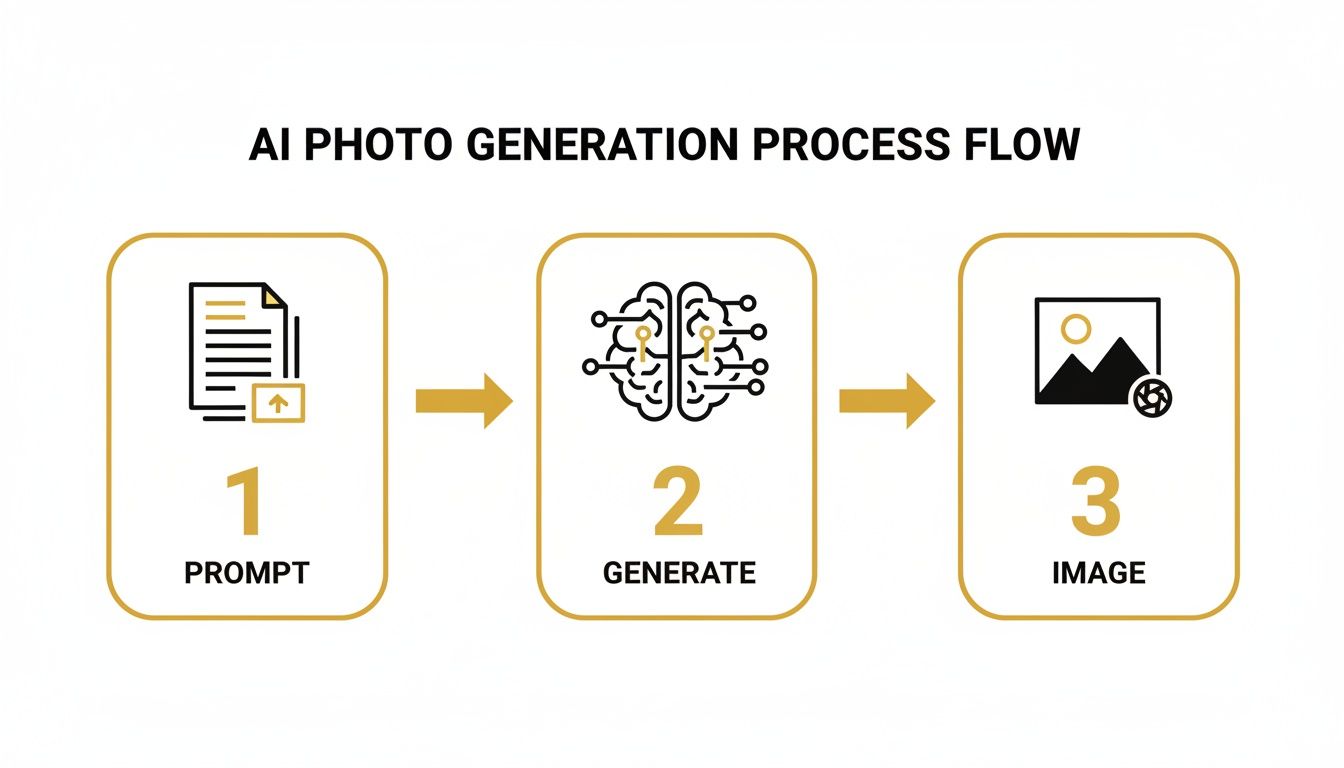
As the diagram shows, your text prompt is the creative fuel, the AI model is the engine, and the output is a high-fidelity image ready to go.
Why This Matters for Creators and Brands
This shift from manual creation to AI-powered generation isn't just a fun novelty; it's a huge change for anyone creating visual content. The global market for AI image generators is expected to explode from USD 9.10 billion to USD 63.29 billion by 2030. That growth is fueled by massive demand from social media, ecommerce, and advertising. You can dive deeper into the numbers with the full AI image generator market growth report from MarkNtel Advisors.
For creators and brands, this means tools like PhotoMaxi are quickly becoming an indispensable part of the modern production toolkit.
The real magic of a realistic AI photo generator is its ability to separate the subject (the person) from the scene. Once the AI truly understands someone's likeness, it can drop that likeness into a virtually infinite number of new contexts. This gives you total creative freedom without the logistics or costs of a physical photoshoot.
The practical differences between these two approaches are night and day. Let's break down exactly how they stack up.
Traditional Photography vs Realistic AI Photo Generation
| Factor | Traditional Photoshoot | AI Photo Generator (e.g., PhotoMaxi) |
|---|---|---|
| Cost | High (photographer, studio, travel, props, models) | Low (flat-rate or subscription-based) |
| Time | Days to weeks (planning, shooting, post-production) | Minutes to hours (prompting, generating, selecting) |
| Logistics | Complex coordination of people, locations, and gear | Minimal; can be done from anywhere with a computer |
| Flexibility | Limited to the day's shoot; reshoots are costly | Infinite; generate endless variations and new scenes |
| Scalability | Difficult; creating 100 unique photos is a huge undertaking | Easy; generate hundreds of images in a single session |
| Consistency | Varies based on lighting, mood, and photographer | High; maintain consistent subject likeness across all images |
Looking at the two side-by-side, it's clear why so many businesses are turning to AI. It’s not about replacing traditional photography entirely, but about providing a powerful, efficient, and scalable alternative for creating high-quality visual content.
What Separates Good AI Photos From Great Ones
Not all images from a realistic AI photo generator are created equal. We've all seen AI generations that look... off. While the technology has come an incredibly long way, there's a big difference between a passable AI photo and one you’d actually bet your marketing campaign on. Knowing what to look for is the first step toward getting consistently great results.
The single most important factor is likeness fidelity. It's a technical-sounding term, but it just means how well the AI-generated person actually looks like the real person you started with. A "good enough" AI photo might get the hair and eye color right, but a truly great one captures the little things: the specific way someone smiles, the unique shape of their eyes, or how their face looks from a slightly different angle.
This is why we built PhotoMaxi to obsess over fidelity. When the likeness is off, you lose the whole point. You're not trying to generate a person; you're trying to put your person into a new scene.
Beyond the Face: Anatomy and Environment
Once you've nailed the face, the next challenge is making the rest of the scene believable. Early AI models were famous for their bizarre mistakes, like giving people six fingers or having a hand merge weirdly with a coffee cup. Things have improved, but these are still tell-tale signs of a lower-quality generator.
A truly convincing AI photo gets these details right:
- Hands That Look Real: Fingers are the right number and proportion, and they hold objects in a way that makes physical sense.
- Plausible Poses: The person's posture looks natural and relaxed, not stiff or contorted into an impossible position.
- Correct Shadows: The subject casts soft, accurate shadows that ground them in the environment. This is a subtle but huge detail.
- Convincing Textures: You can see the weave on a sweater, the subtle pores on skin, and the way light reflects off a pair of glasses.
When these elements are missing, the image lands squarely in the "uncanny valley"—that creepy feeling you get when something looks almost human, but your brain knows it's not quite right.
A truly realistic AI photo isn't just a collection of correct pixels; it's a cohesive scene where light, shadow, texture, and anatomy all follow the rules of the physical world. The best generators understand these rules implicitly.
Evaluating Lighting and Cohesion
The final test for any AI-generated image is the lighting. Does the light on your subject actually match the light in the background scene? This is a dead giveaway. If you asked for a shot at "golden hour," your model should be bathed in that warm, low-angle sunlight, not lit by the harsh blue tones of an office fluorescent.
This is where many free or basic tools fall flat. They can often place a decent-looking person into a decent-looking background, but the two feel totally separate, like a bad Photoshop job. The lighting doesn't wrap around the subject naturally.
Top-tier generators, on the other hand, create the entire image as one unified piece. The light source affects everything in the scene, from the main subject to the background, creating a seamless and believable final photo.
If you want to see how different tools stack up, our guide to the best AI photo generator platforms breaks down which ones really excel at this. At the end of the day, it's this ability to create a cohesive reality that turns an AI image from a fun novelty into a powerful business asset.
Writing Prompts That Create Lifelike Images
Think of a prompt as a creative brief you’re handing off to your own personal AI photographer. The quality of your instructions directly dictates the quality of the final image. A vague prompt will almost always lead to a generic, often disappointing result. But a detailed, specific prompt? That's how you unlock the true power of a realistic AI photo generator.
Getting this right means moving beyond simple descriptions like "a woman in a coffee shop." Sure, that might produce an image, but it won't be a great one. The secret is to think like a professional photographer and give the AI the same critical details a human would need to set up the perfect shot.
The Anatomy of a Powerful Prompt
A high-impact prompt is built from several key components that work together to create a cohesive and believable scene. By combining these elements, you gain incredibly precise creative control over the final output.
Here are the core ingredients of a prompt that delivers photorealistic results:
- Subject and Action: Clearly define who is in the photo and what they’re doing. Be descriptive. Instead of "man working," try "a young man with glasses, focused, typing on a laptop."
- Setting and Background: Establish the environment with specific details. "In an office" is okay, but "in a bright, modern co-working space with large windows and indoor plants" is far better.
- Clothing and Style: Specify the attire right down to the texture and color. "Wearing a blue t-shirt" becomes "wearing a navy blue, soft cotton crewneck t-shirt." This level of detail adds an immense amount of realism.
These foundational elements set the stage. But the real magic happens when you start adding professional photography and artistic details to your prompt.
Adding a Professional Photographer’s Eye
This is where you elevate your prompt from a simple description to a true creative direction. By incorporating terms from photography and cinematography, you’re telling the AI not just what to create, but how to capture it.
A great prompt doesn't just describe a scene; it directs a virtual photoshoot. By specifying camera settings, lighting, and mood, you are essentially stepping behind the lens and controlling every artistic choice the AI makes.
Consider layering in these advanced modifiers:
- Lighting: This is arguably the most crucial element for realism. Use terms like "soft morning light," "dramatic Rembrandt lighting," "golden hour glow," or "neon-lit alleyway at night."
- Camera Settings: Specify the lens and shot type to control perspective and focus. Think in terms like "85mm portrait lens with a shallow depth of field," "wide-angle shot," or "macro detail shot."
- Mood and Atmosphere: Define the emotional tone of the image. Words like "cinematic and dramatic," "serene and peaceful," or "energetic and vibrant" guide the AI’s stylistic choices.
Let's look at a quick before-and-after example to see the impact.
Simple Prompt: A woman standing in front of a building.
Advanced Prompt: Professional headshot of a smiling woman, standing outside a modern glass office building. Soft morning light, 85mm portrait lens, shallow depth of field, cinematic style.
The second prompt will produce a vastly more realistic and professional image because it gives the AI clear, actionable instructions.
Using Negative Prompts for Refinement
Just as important as telling the AI what to include is telling it what to leave out. This is where negative prompts come in. These are simply keywords for elements you want to avoid, helping you clean up the final image and remove common AI flaws.
Common negative prompts include:
Deformed, extra fingers, distorted handsCartoon, illustration, paintingBlurry, out of focusWatermark, text, signature
Using negative prompts is like telling your photographer, "make sure there are no distracting people in the background." It’s a simple but powerful way to refine the output and push the image much closer to your vision.
The demand for this level of control is a global phenomenon. In 2022, North America represented about 39.99% of the global AI image generator market, with providers in the U.S. capturing nearly 75% of domestic revenue due to the high demand for polished advertising and ecommerce content. For platforms like PhotoMaxi, supporting advanced prompting techniques is essential to serve these fast-growing international markets. You can explore more details about these trends in the full market analysis from Fortune Business Insights.
Practical Workflows for Creators and Brands
Knowing the tech is one thing, but the real magic happens when you put a realistic AI photo generator to work. This is where theory turns into execution, and you start seeing a dramatic difference in how you create content—saving a ton of time and money in the process.
For both creators and brands, the end goal is always the same: high-quality, on-brand visuals, produced consistently. The game-changer is that AI lets you compress what used to be weeks of production into a single afternoon, all from your desk.
Workflow for Social Media Creators
Imagine needing a full month's worth of diverse, high-quality photos for your Instagram feed. The old way meant juggling photoshoots, scouting locations, changing outfits, and then spending hours editing. With a platform like PhotoMaxi, that whole process gets a lot simpler and way faster.
- Create Your AI Model: First, you’ll upload a clear photo of yourself. This is a one-time step that trains the AI to understand your likeness with incredible accuracy, creating a reusable digital twin you can place in any scene.
- Plan Your Content Calendar: Think about the different posts you need for the month. Maybe a professional shot for a collaboration, a cozy café picture for a lifestyle update, and a stunning travel-themed photo to inspire your audience. Jot down a list of scenes, outfits, and moods.
- Generate Images in Batches: Now, turn your content ideas into detailed prompts. Something like, "A woman laughing, holding a coffee cup in a bright, modern café, soft morning light, 50mm lens." You can run these prompts in batches, getting dozens of options for each theme in just a few minutes.
- Select and Schedule: Sift through the generated images, pick the ones that perfectly match your brand's vibe, and load them into your scheduler. A task that once took weeks is now done in a couple of hours.
The real freedom here is decoupling yourself from the environment. You can create content for any season, event, or trend on a whim, without being limited by weather, travel costs, or studio access.
This isn't just a niche trend. A recent report found that 20% of Americans have already used AI to create images or videos. What’s more, 71% believe AI-generated images are now commonplace on social media. People are getting used to seeing AI-powered visuals, and the tools are here to help you keep up. You can dive deeper by checking out Photoroom's comprehensive AI imaging statistics.
Workflow for Ecommerce Brands
For e-commerce businesses, the applications are even more direct, especially when it comes to product photography and marketing. A realistic AI photo generator can eliminate huge logistical headaches and open up new creative avenues, particularly if it connects with services like Shopify.
Product Photography on a Model
- Step 1 - Shoot the Product: Start with a clean, simple photo of your product—a t-shirt, a pair of sunglasses, a necklace—on a plain background.
- Step 2 - Generate the Model: Create an AI model that fits your brand’s target demographic, or use pre-existing ones available in a platform like PhotoMaxi.
- Step 3 - Composite with a Prompt: Upload your product shot and use a text prompt to place it onto your AI model in a believable setting. For example: "A smiling model wearing the uploaded white t-shirt, standing in a sunny urban park, natural lighting." The AI handles the tricky parts, like draping the fabric realistically and matching the light.
- Step 4 - Create Variations: Repeat this process to show the same item on different models, in different locations, or styled in multiple ways. All without booking a single photoshoot.
Virtual Try-On Campaigns
The workflow for virtual try-ons is similar but adds a layer of personalization. Brands can let customers see what a product looks like on a model who resembles them, which is a powerful way to boost conversions. It helps shoppers see the item in their own life, which is a critical step in the online buying journey for fashion and accessories.
For anyone just getting started, learning how to generate AI images from a photo is the perfect first step into this new world of content creation.
How to Fix Common AI Generation Problems

Even the best realistic AI photo generator will occasionally throw you a curveball. You'll get a nearly perfect portrait, but then you spot it: a hand with six fingers. Or a group shot where one face in the background is a blurry mess. These little glitches are part of the process, but they're absolutely fixable.
Learning to troubleshoot these errors is what takes you from a casual user to someone who can reliably create professional-grade images. Instead of scrapping an otherwise fantastic generation, a little prompt refinement and some post-processing can get you across the finish line.
It’s all about keeping creative control and knowing how to nudge the technology when it stumbles. This way, you can turn a great photo into a flawless one.
Correcting Unnatural Hands and Limbs
Hands have historically been the Achilles' heel of AI image generation. Their incredible complexity and range of motion often lead to extra fingers, wonky proportions, or just plain weird poses. When this happens, don't hit delete just yet.
Try these targeted fixes first:
- Refine Your Prompt: Get more specific. Add phrases like "anatomically correct hands" or "five fingers" to your prompt. You can also use a negative prompt—think of it as telling the AI what not to do—with terms like
extra fingers, deformed hands, mutated limbs. - Use Inpainting: Inpainting is your secret weapon for small mistakes. In a tool like PhotoMaxi, you can simply mask the problematic hand and feed the AI a new, simple prompt like "a realistic human hand resting on a table." It will regenerate just that tiny section, leaving the rest of your image untouched.
- Crop Strategically: Sometimes the easiest solution is the most elegant. If the hands aren't crucial to the story you're telling, a clever crop might eliminate the problem entirely while tightening up your composition.
Fixing Distorted Faces in Wide Shots
You've probably seen this one before. In a wide shot with a crowd, the main subject looks incredible, but the faces in the background are smudged or generic. This happens because the AI model focuses most of its computational power on what it perceives to be the focal point.
The key to fixing secondary character flaws is often found in post-generation editing. While a perfect prompt helps, the most reliable fixes for small imperfections come from tools that allow for targeted regeneration or manual touch-ups.
For creators who need every last detail to be perfect, exploring the best AI photo editing software is a game-changer. These platforms are built for this kind of precise, pixel-level control.
Resolving Inconsistent Lighting and Shadows
Nothing screams "AI-generated" louder than mismatched lighting. A character bathed in warm, golden-hour light standing in a scene that's clearly in the cool shade of an alleyway just doesn't look right. Believability is all about cohesive light.
Your best defense here is a good offense—starting with a descriptive prompt.
- Specify Your Light Source: Don't just say "daytime." Tell the AI exactly what you want. Use phrases like "soft light from a window on the left," "dramatic backlighting from the sunset," or "harsh overhead fluorescent lighting."
- Look for a Relighting Tool: Some more advanced editors have relighting features that feel like magic. They let you move the light source, change its intensity, and even alter its color after the image has been created.
- Adjust with Color Correction: If you don't have a relighting tool, you can often fix minor inconsistencies in a standard photo editor. A little color grading to warm up the shadows or cool down the highlights can go a long way in making the subject and background feel like they belong together.
Navigating the Murky Waters of Copyright and AI Photos
As these incredibly realistic AI photo generators become more common, we have to talk about the legal and ethical side of things. It's not just about staying out of trouble; it's about using these powerful tools with integrity, especially when you're creating visuals for your brand or business.
So, who actually owns a picture made by an AI? That’s the big question, and the legal world is still catching up. Right now, the general feeling in places like the United States is that an image created entirely by AI, without a heavy dose of human creative input, can't be copyrighted. But that doesn't mean it's a complete free-for-all.
What really matters are the terms of service of the platform you're using. When you generate an image with a tool like PhotoMaxi, the rules for how you can use that image are laid out in their agreement. This is where you absolutely need to pay attention to the difference between personal and commercial use.
Personal vs. Commercial Use: What You Need to Know
For any creator or brand, understanding your usage license is non-negotiable. The terms will spell out exactly how you can use the photos you create, and it almost always boils down to two main buckets.
- Personal Use: This is for anything that doesn't make you money. Think of a new profile picture, a post on your personal Instagram, or printing a cool image to hang on your wall.
- Commercial Use: This is the big one. If an image is used in any way to sell a product, promote a business, or generate revenue, it's commercial. This includes everything from digital ads and product listings to brand-focused social media content and website banners.
Most platforms, PhotoMaxi included, tie commercial rights directly to their paid plans. If you want to legally use an AI photo in a marketing campaign or on your e-commerce site, you have to be on a subscription that grants a commercial license. It’s a small step that protects you and your business from big headaches later.
The Ethics of Data and Why Disclosure Matters
Beyond the legal fine print, there are important ethical questions to consider. A major one is how the AI model was trained in the first place. Ethically developed models learn from datasets that are properly licensed, are in the public domain, or were created from scratch for training purposes. This respects the work and rights of the original photographers and artists.
Using a service that's committed to ethical data sourcing means you can build your brand on a solid foundation, without worrying that you're benefiting from someone else's stolen work.
Finally, let's talk about being upfront with your audience. While it isn't always a legal requirement, letting people know that an image is AI-generated is quickly becoming a best practice. It’s about transparency. This simple act builds trust, manages expectations, and shows that you're using this amazing technology responsibly.
Answering Your Questions
Can I Actually Use These AI Photos for My Business?
Yes, you absolutely can. When you're using a service like PhotoMaxi, what you can do with the images really comes down to your subscription plan. Typically, free or starter plans are meant for personal projects and experimentation.
But once you step up to a professional or business-tier plan, you're granted commercial usage rights. That's the green light to use your AI-generated photos for everything from e-commerce product listings and marketing campaigns to monetized social media content. Just make sure to give the terms of service a quick read for any platform you use.
How Do I Make Sure the AI-Generated Person Actually Looks Like Me Every Time?
This is the million-dollar question, and it's where a professional realistic AI photo generator really shines. Getting that consistent likeness, or "fidelity," is a common hurdle. The best way to start is by giving the AI good source material—a handful of clear, well-lit photos of yourself is ideal for training your personal model.
From there, it’s about using a platform built for consistency. PhotoMaxi, for example, is engineered specifically to lock in facial features and replicate them accurately from one image to the next. A pro tip: try to keep your prompts similar when creating a set of photos and stick with the same trained model for the whole batch.
The secret to a consistent likeness isn't just a good source photo; it's using an AI that's built from the ground up to remember and replicate your unique features accurately every single time.
Is This Complicated to Set Up? Do I Need to Be a Tech Expert?
Not in the slightest. Modern AI photo tools are designed to be incredibly user-friendly, whether you're a seasoned creative or a complete beginner. The process is pretty simple: you upload a single clear photo, and the platform creates your personal AI model from it.
After that initial setup, it’s all about describing what you want in plain English. You just type out the scene, the outfit, the pose, and the style. While there's a bit of an art to writing advanced prompts, you can genuinely go from signing up to having your first set of amazing, realistic photos in just a few minutes.
Ready to stop scheduling photoshoots and start creating? PhotoMaxi gives you a personal AI photographer that brings your vision to life in minutes. Generate your first studio-quality photos today!
Related Articles


Ready to Create Amazing AI Photos?
Join thousands of creators using PhotoMaxi to generate stunning AI-powered images and videos.
Get Started Free